Why background jobs fail in production and not in development
Moving work out of the request is the easy part: add a job, return a response, let a worker send the email or sync the feed. The trouble starts later and has little to do with the queue library's API. A deploy kills a worker halfway through a job. A job that takes ninety seconds on a busy CPU is declared dead and handed to a second worker while the first is still running it. Redis, set up as a cache, evicts a key the queue depended on. A year of completed jobs fills memory. The same alert goes out twice.
Each of those is a documented behavior with a documented setting. This article walks through them for BullMQ on Redis, quoting the BullMQ and Redis documentation as read on October 12, 2026.
What BullMQ is, and its model
BullMQ describes itself as a Node.js library that implements a queue system built on top of Redis. Its stated delivery goal is worth reading closely, because it sets the rules for everything else: it attempts to deliver every message exactly one time, but it will deliver at least once in the worst case scenario. A job can therefore run more than once, and the handler has to be written for that.
The version current in the documentation's changelog on the day we read it was 6.3.13, dated 2026-10-12. Version 6 matters if you are reading older tutorials: it removes the legacy repeatable-job APIs introduced before Job Schedulers and removes the old debounce option in favor of deduplication, and its 6.0.0 changelog entry introduces the IQueueBackend abstraction, with Redis and PostgreSQL backends. The documentation describes an optional PostgreSQL backend that runs the same API, and says the Redis backend remains the default and the most battle-tested option. Redis is the backend this article covers. Beyond the Queue that producers add jobs to and the Worker that processes them, two building blocks are worth naming:
- Flows. Parent and child jobs, added with the
FlowProducerclass. A parent will not be moved to the wait status until all its children jobs have been processed successfully, and it can read their results withgetChildrenValues. - Job Schedulers. The current name for recurring work. A Job Scheduler acts as a factory, producing jobs based on specified “repeat” settings: a fixed interval or a cron pattern. The documentation notes that, for historical reasons, the jobs it produces are often referred to as “Repeatable Jobs”.
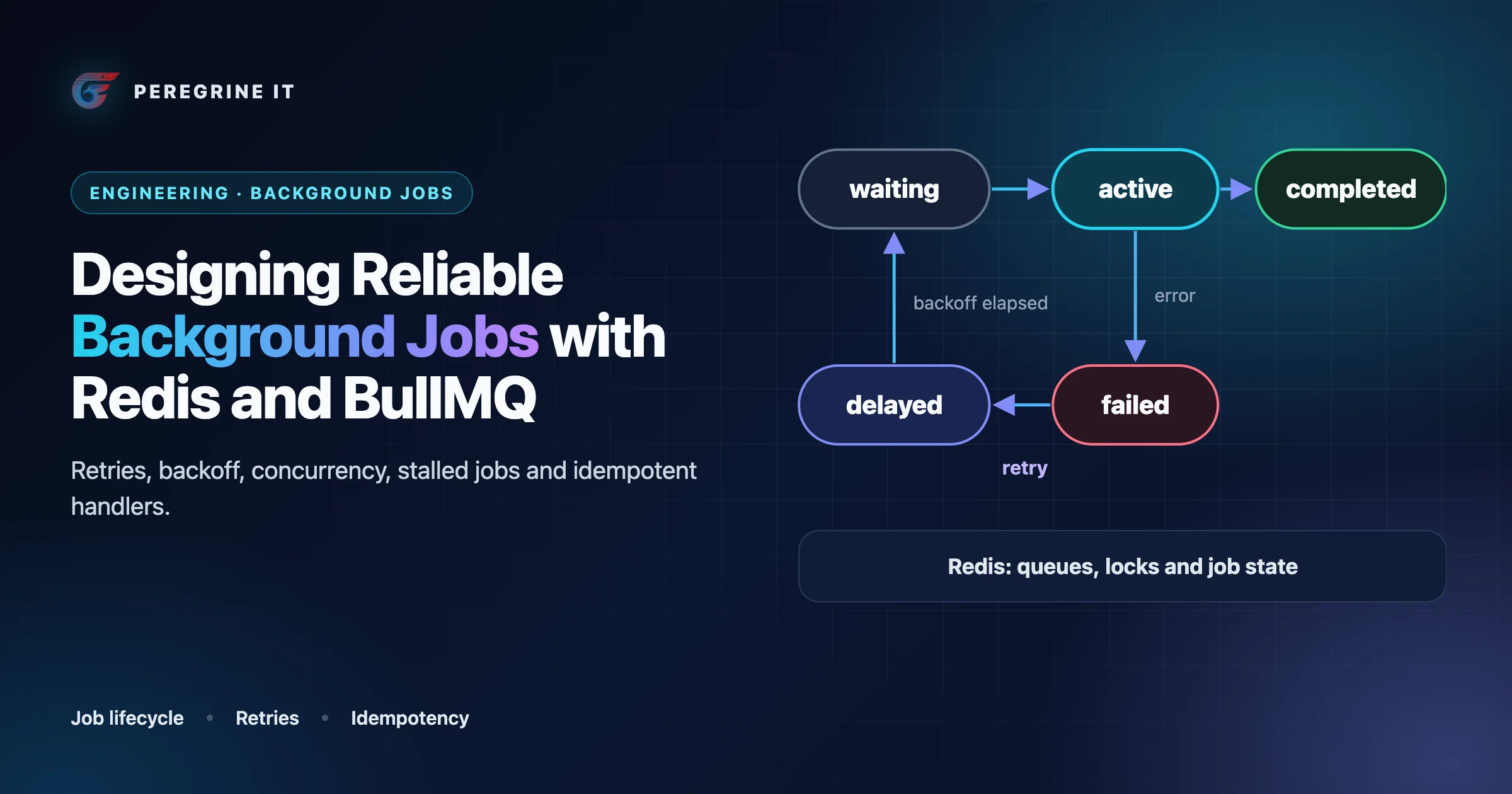
The job lifecycle
The same lifecycle as a list, with the documentation's state names:
- wait, prioritized, delayed. A job added to a queue can be in one of three states: wait, the waiting list; prioritized; or delayed, waiting for a timeout before it joins the waiting list or the prioritized set.
- active. Jobs that are currently being processed. A job stays active until the process function completes or throws.
- completed, failed. The two final states. By default finished jobs are kept in two special sets, the “completed” and the “failed” set.
- waiting-children. A parent job added by a flow producer that is waiting for all its children to be completed; it joins the waiting list, the delayed set or the prioritized set when the last child completes.
- Retry path. A job that throws while attempts remain goes back to be processed again, after its backoff delay if one is set. A stalled job takes the same route: there is not a ‘stalled’ state, only a ‘stalled’ event emitted when a job is automatically moved from active to waiting state.
These are also the names the counting API takes: getJobCounts('wait', 'completed', 'failed'), which is the simplest queue-depth metric you can export.
A queue, a worker and an idempotent handler
The example below is a listing-alert email job, the kind of work behind saved searches and listing alerts. It is illustrative: the queue name, limits and helper functions are examples, and the option names are the ones in the BullMQ documentation.
// Illustrative. queue.ts: the producer side.
import { Queue } from 'bullmq';

export const alerts = new Queue('listing-alerts', {
  // Producers should fail fast if Redis is unreachable (see "Connection handling").
  connection: { host: process.env.REDIS_HOST, port: 6379, enableOfflineQueue: false },
  defaultJobOptions: {
    attempts: 5,                                   // 1 try + 4 retries
    backoff: { type: 'exponential', delay: 2000, jitter: 0.5 },
    removeOnComplete: { age: 3600, count: 1000 },  // keep 1 hour, at most 1,000
    removeOnFail: { age: 7 * 24 * 3600 },          // keep failures a week for inspection
  },
});

export async function enqueueAlert(tenantId: string, searchId: string, listingKey: string) {
  // A custom job id: adding the same alert twice while the first is still in the
  // queue is ignored. BullMQ rejects ':' in a custom id and ids that are digits only,
  // so strip ':' from listing keys if your MLS source uses it.
  await alerts.add(
    'send-alert',
    { tenantId, searchId, listingKey },             // ids only: no personal data in the payload
    { jobId: `alert-${searchId}-${listingKey}` },
  );
}
// Illustrative. worker.ts: the consumer side, with retry/backoff and an idempotent handler.
import { Worker, UnrecoverableError } from 'bullmq';
import { db, mailer, isPermanent, log } from './deps'; // your own modules
const worker = new Worker(
'listing-alerts',
async (job) => {
const { tenantId, searchId, listingKey } = job.data;
const key = `alert-${searchId}-${listingKey}`;
// 1. Read current state; the world may have changed since the job was added.
const search = await db.savedSearch.find(tenantId, searchId);
if (!search || !search.active) return 'search removed';
// 2. Claim the effect. One INSERT ... ON CONFLICT under a unique constraint on
// (tenant, key), so two workers running this job at once cannot both proceed.
// A check-then-send would let both pass the check and both send.
// takeOverAfterMs must exceed the time a send can take (the mailer times out at 5 s).
const claim = await db.alertSent.claim(tenantId, key, { takeOverAfterMs: 10_000 });
if (claim === 'sent') return 'already sent'; // an earlier run finished
if (claim === 'held') throw new Error('claim held by another run'); // retried with backoff
// claim === 'mine': a new claim, or one abandoned by a run that crashed
// 3. Do the side effect, passing the same key downstream where the provider supports it.
try {
await mailer.send({ to: search.email, template: 'new-listing', listingKey, idempotencyKey: key });
} catch (err) {
if (isPermanent(err)) throw new UnrecoverableError('address rejected'); // no retries
throw err; // an Error: retried with backoff
}
// 4. Mark the claim as sent.
await db.alertSent.markSent(tenantId, key);
return 'sent';
},
{
connection: { host: process.env.REDIS_HOST, port: 6379 },
concurrency: 10, // I/O-bound work
limiter: { max: 20, duration: 1000 }, // at most 20 jobs per second, across all workers
},
);
worker.on('failed', (job, err) => log.warn({ jobId: job?.id, attempts: job?.attemptsMade, err }));
worker.on('error', (err) => log.error(err)); // connection problems surface here
const shutdown = async () => { await worker.close(); process.exit(0); };
process.on('SIGINT', shutdown);
process.on('SIGTERM', shutdown);The sections below explain each choice in those two files.
Retries and backoff
Retries are off until you ask for them: to activate automatic retries you use the attempts setting with a value larger than 1, and without a backoff function jobs are retried without delay as soon as they fail, which is rarely what a struggling downstream service needs.
- Built-in strategies. The current built-in backoff functions are fixed and exponential. Exponential backoff will retry after 2 ^ (attempts - 1) * delay milliseconds.
- Jitter. Both accept a
jitteroption, a value between 0 and 1, where 0 means no randomness and 1 means delays anywhere between zero and the computed maximum. With 0.5, as in the example, the delay falls between half the computed value and the full value. Jitter keeps jobs that failed together from retrying together; the reasoning is in reliable webhook and event-driven integrations. - Custom strategies. A
backoffStrategyfunction in the worker settings computes the delay; returning -1 means jobs won't be retried and are moved to failed. This is the place to honor aRetry-Afterheader. - Do not retry what cannot succeed. Throwing
UnrecoverableErrormakes BullMQ move the job to the failed set without performing any retries. A malformed payload or a rejected address is not going to improve on the fifth attempt. - Throw real errors. The documentation warns that the exceptions thrown in a processor must be an Error object for BullMQ to work correctly.
Choose attempts and delay from how long the dependency is likely to be unavailable. With the example values, the last retry happens at most about thirty seconds after the first failure (2 + 4 + 8 + 16), which covers a restart but not a provider outage. For longer outages, prefer a higher base delay to dozens of attempts.
Concurrency and rate limiting
These are different controls, and BullMQ has three of them:
| Control | Scope | What the documentation says | Use it for |
|---|---|---|---|
Worker concurrency | One worker instance | How many jobs are allowed to be processed concurrently for that instance; it works only when the processor performs asynchronous operations | I/O-bound jobs: HTTP calls, database queries |
| More worker processes | The fleet | The recommended way to setup BullMQ, because it also gives higher availability | Throughput and surviving a host failure |
| Global concurrency | The whole queue | How many jobs are allowed to be processed in parallel across all your worker instances, set with setGlobalConcurrency | Protecting a resource that tolerates only N simultaneous users, for example one MLS feed |
limiter (max, duration) | The whole queue | The rate limiter is global: ten workers with a limit of 10 per second still process 10 per second in total. Rate-limited jobs stay in the waiting state | Staying under an API's published request rate |
Two practical notes. When an API answers 429, a worker can pause the whole queue for the period the API asks for with the manual rate limit (await worker.rateLimit(ms), then throw Worker.RateLimitError(), with limiter options set on the worker), and the documentation says that in this case the attempts check is ignored, as rate limiting is not considered a real error. And the open-source limiter is per queue, not per key: the documentation states that from BullMQ 3.0 and onwards, group keys support is removed. In a multi-tenant product that means per-tenant fairness is something you design, for example with a queue per class of work plus a per-tenant counter checked in the handler; the tenancy side is in multi-tenant real estate SaaS.
Stalled jobs: what makes a job stall
When a worker starts a job, BullMQ will place a lock on this job, and the worker must keep renewing it. If it cannot, the job is treated as abandoned. That is the mechanism that rescues jobs from crashed workers, and it is also how a job comes to run twice. The troubleshooting page lists why a lock is lost; the first three are the ones to design against:
- The worker is consuming too much CPU and has no time to renew the lock every 30 seconds, the default expiration time for locks. Node.js runs the processor and the lock renewal on the same event loop, so a long synchronous loop (parsing a large file, resizing images, a heavy JSON transform) blocks both.
- The worker has lost communication with Redis and cannot renew the lock in time.
- The Redis instance has a wrong maxmemory policy, so Redis removed the lock key itself.
- The process was killed without a graceful shutdown.
What happens next: a stalled job is moved back to the waiting status and will be processed again by another worker, and if it stalls more than maxStalledCount allows it is failed permanently with the error “job stalled more than allowable limit”. The default is 1, as stalled jobs should be a rare occurrence. The original worker may not know it lost the job. If it was only slow, it carries on, and two workers are now running the same job. That is the concrete reason handlers must be idempotent.
For CPU-heavy work, the documentation's answer is sandboxed processors, which run the processor in a separate process (or worker thread) from the bookkeeping, so that they will not result in stalled jobs as easily as standard workers. In ordinary workers, break long computations into chunks that yield to the event loop.
Idempotent handlers, job ids and deduplication
BullMQ's own pattern page puts the requirement in one sentence: it should not make a difference to the final state of the system if a job successfully completes on its first attempt, or if it fails initially and succeeds when retried. There are two layers, and they solve different problems.
Layer 1: do not enqueue the same work twice. A custom jobId does this: if you add a job with an existing id then that job will just be ignored and not added to the queue at all. Three caveats from the same page: the id must not contain the : separator; it must not be a string that consists only of digits; and removed jobs do not count, so you can add the same job id many times over as long as the previous job has already been removed from the queue. With removeOnComplete in use, that last point means a job id protects only while the earlier job still exists.
The newer deduplication option covers the timing cases explicitly. In simple mode, a job with the same deduplication id will be ignored as long as the job remains in an incomplete state; with a ttl (throttle mode), a similar job added during this delay period is ignored; debounce mode keeps only the most recent job's data; and keepLastIfActive guarantees at most 1 job per deduplication ID is active at any time while still running once more with the latest data. That last mode fits “re-index this listing” or “sync this feed” triggers that can fire many times in a burst.
Layer 2: make the handler safe to run twice anyway. Layer 1 cannot help when a job stalls and runs on two workers, or fails after its side effect and is retried. The handler in the example shows the pattern we would use:
- Derive a key from what must happen once (this alert for this search and listing), not from the job.
- Re-read current state; do not act on a snapshot in the payload.
- Claim the key with an insert under a unique constraint. Checking first and recording afterwards is not enough: two runs of a stalled job can both pass the check before either records anything.
- Perform the side effect, passing the key to the provider as an idempotency key if it accepts one.
- Mark the claim as done.
One gap remains, between steps 4 and 5: a crash there leaves a claim that is never marked done. The example takes such a claim over after ten seconds and sends again, so the retry is a duplicate unless the provider deduplicates on the key. That figure is illustrative and tied to two others: it must be longer than a send can take, and the retry schedule must outlast it, or the job runs out of attempts while the claim is still held (here the last retry comes at least 15 seconds after the first failure). Refusing to take over closes that gap and opens the opposite one (claimed but never sent). No ordering removes both without the downstream system's help, so decide per job which error is cheaper: a rare duplicate email, or a rare missing one. For a payment or a payout the answer is different from an alert, and the provider's idempotency key is not optional. Keeping jobs small helps: the pattern page advises that jobs should be as atomic and simple as possible, and a job with five side effects has five places to fail halfway. Split them, with a flow if the order matters.
Delayed jobs, Job Schedulers and priorities
Delayed jobs. A delay in milliseconds puts the job in the delayed set. The timing is a lower bound: it is not guaranteed that the job will be processed at the exact delayed time specified, as it depends on how busy the workers are. Delayed jobs suit follow-ups such as “check in ten minutes whether this lead got a response” (see real estate CRM architecture). Design them so the job checks whether it is still needed when it runs, instead of cancelling it when circumstances change; a delayed job can also be rescheduled with changeDelay.
Job Schedulers. Recurring work is created with upsertJobScheduler, given a scheduler id and either every (milliseconds) or a cron pattern. Four documented properties matter in production:
- It is an upsert, which ensures the scheduler is updated or created without duplications. Calling it at every deploy is safe; this replaces the old problem of duplicate repeatable jobs after a schedule change.
- The scheduler will only generate new jobs when the last job begins processing, so a busy queue yields fewer runs than the interval suggests. A missed run is not queued up behind the current one.
- For cron in UTC, use tz: 'UTC' in scheduler options.
- Jobs from a scheduler get a special id, so you cannot choose a custom job id for them.
A scheduler fires the trigger; it does not make the work safe to overlap. A sync that sometimes runs longer than its interval still needs a guard, such as a queue-level global concurrency of one or a deduplication id. The MLS sync engine article covers that case for listing feeds.
Priorities. Priority values run from 1 to 2 097 151, where a lower number is always a higher priority, and the counter-intuitive part is the default: jobs without a priority get the highest priority, being processed before jobs with priorities assigned to them. Adding prioritized jobs is also slower, with a complexity O(log(n)) relative to the number of jobs in the prioritized set. Priorities reorder one queue; they do not reserve capacity. If password-reset emails must never wait behind a bulk campaign, give them their own queue and workers. Use priorities for ordering within one kind of work.
Graceful shutdown
Every deploy stops workers. worker.close() will mark the worker as closing so it will not pick up new jobs, and at the same time it will wait for all the current jobs to be processed (or failed). The catch is in the next sentence of the documentation: this call will not timeout by itself. Your orchestrator has a timeout even if the call does not. If jobs can run for two minutes and the platform sends a kill signal after thirty seconds, every deploy produces stalled jobs, which are picked up with a waiting time of about 30 seconds by default and run again from the start.
- Handle both signals. The documentation recommends listening for both SIGINT and SIGTERM.
- Set the platform's termination grace period longer than your longest normal job, or make long jobs shorter.
- For long jobs, checkpoint progress in your database so a rerun resumes instead of restarting, or split the work into a flow of small children.
- BullMQ has no built-in job timeout: the documentation says it does not provide a specific mechanism to timeout jobs and shows the pattern with an
AbortControllerinside the processor. Put a timeout on every outbound call a job makes.
Redis configuration BullMQ requires
A Redis instance configured as a cache is the wrong shape for a queue, and the two settings below are the ones the BullMQ documentation is emphatic about.
Eviction: maxmemory-policy noeviction. The production guide says BullMQ cannot work properly if Redis evicts keys arbitrarily, and that setting maxmemory-policy to noeviction is the only setting that guarantees the correct behavior of the queues. Redis defines that policy as: keys are not evicted but the server will return an error when you try to execute commands that cache new data. So the failure changes from silent corruption (a lock or a job vanishing) to a loud one (writes rejected when memory is full), which is the one you can alert on. It follows that a queue should not share a Redis instance with a cache that relies on eviction; the cache settings are covered in the tech stack guide.
Persistence: AOF. The guide notes that many hosting solutions do not offer persistence by default and recommends enabling AOF (Append Only File), adding that 1 second per write is enough for most applications. Redis documents what that setting means: with the default policy of fsync every second, you can only lose one second worth of writes, whereas with snapshots (RDB) alone, which are usually taken every five minutes or more, Redis says it is NOT good if you need to minimize the chance of data loss. Without persistence, a Redis restart empties every queue, including delayed jobs and schedulers.
Even with AOF, up to a second of acknowledged add calls can be lost in a crash. If a job must not be lost, the database is the source of truth and the queue is the delivery mechanism: write a row saying the work is needed, in the same transaction as the business change, then enqueue from it. That is the outbox pattern from the webhook article, applied to jobs.
Connection handling
- Producers and workers want opposite behavior when Redis is down. The production guide: operations on the
Queueclass should fail quickly if there is a temporal disconnection, whereas for Workers we want to wait indefinitely. By defaultaddwill keep waiting for a reconnection; in an HTTP handler that means a hung request. PassingenableOfflineQueue: falseon the producer's connection makes it throw instead, so the endpoint can return an error. - Workers need
maxRetriesPerRequest: nullwhen you pass your own ioredis instance; BullMQ will throw an exception if this setting is not set to null when the client is passed to a worker. - Count connections. Every class will consume at least one Redis connection, and classes that use blocking commands, such as
WorkerandQueueEvents, create an extra one. Managed Redis plans cap connections, so the total across all processes is worth computing before scaling out. - Do not use ioredis
keyPrefix. It is not compatible with BullMQ, which provides its own key prefixing mechanism through theprefixoption. - Attach error handlers. An
errorlistener on queues and workers logs connection problems and, as the guide puts it, prevents “unhandled errors”. - Keep sensitive data out of payloads. The guide points out that the data field of the jobs is stored in clear text. Put ids in the payload and read the record in the handler, which also means the job acts on current data.
Observability
What we would export from day one, and where BullMQ provides it:
- Queue depth and age. Counts by state from
getJobCounts, plus the age of the oldest job in wait. Depth alone misleads; a queue of ten jobs that are an hour old is worse than a thousand that are a second old. - Throughput and failures. Built-in metrics let workers count the number of jobs they have processed per minute, enabled with the
metricsworker option and read withgetMetrics. There is also a simple API to export metrics to Prometheus,exportPrometheusMetrics(). - Events. Worker events are local to the process that ran the job; the
QueueEventsclass listens across all workers and is implemented using Redis streams, so events are not lost during a disconnection the way plain pub-sub messages would be. The stream is trimmed, by default to about 10,000 events, so treat it as a live feed, not an audit log. Thestalledandfailedevents are the two to alert on. - Traces. BullMQ has a telemetry interface that supports the OpenTelemetry specification, which links the request that enqueued a job to the worker that ran it.
- A dashboard for inspecting and retrying individual jobs can delete jobs and read every payload, so put it behind your own authentication and treat it as an admin tool.
Failure modes and what to do about them
| Failure | What happens | Design response |
|---|---|---|
| Redis unreachable | Workers wait and reconnect; add hangs by default | enableOfflineQueue: false on producers; return an error or fall back to an outbox row; alert on the error event |
| Redis restarts without persistence | All queued, delayed and scheduled jobs are gone | AOF enabled; database rows as the source of truth for work that must not be lost; a reconciliation job that re-enqueues what is missing |
| Redis memory full | With noeviction, writes are rejected; with any other policy, keys disappear | noeviction, a memory alert well below the limit, and job removal settings |
| Memory growth from finished jobs | By default jobs are either completed or failed and kept forever | removeOnComplete and removeOnFail with a count, an age, or both; the documentation suggests keeping a handful of completed jobs and a much larger value of failed jobs |
| Poison job (always throws) | Consumes its attempts, then sits in failed; without attempts set it fails once | Bounded attempts; UnrecoverableError for known-permanent errors; alert on the failed count; keep failed jobs long enough to inspect and retry after a fix |
| Long or CPU-heavy job | Lock not renewed; job stalls and runs again elsewhere | Sandboxed processors; chunk the work; idempotent handler; alert on the stalled event |
| Worker killed during deploy | Active jobs stall and restart from the beginning | worker.close() on SIGTERM; grace period longer than the longest job; checkpoints |
| Duplicate execution | Side effect happens twice | Idempotent handler keyed on the business effect; provider idempotency keys |
| Backlog after an outage | Thousands of jobs start at once against a recovering dependency | Queue rate limit or global concurrency; backoff with jitter |
| Scheduler falls behind | Fewer runs than the interval; runs do not pile up | Alert on time since the last successful run, not on the schedule |
One detail on removal: it is lazy. The documentation notes that jobs are not removed unless a new job completes or fails, so an idle queue keeps its last finished jobs until activity resumes. And failed jobs are your dead-letter store, so size removeOnFail by how long it takes someone to look at them.
When a queue is the wrong tool
- The caller needs the answer now. If the user is waiting for the result, a job adds latency and a polling problem. Do it in the request, with a timeout, and queue only the parts that can lag.
- The work must commit atomically with a database change. A job enqueued before the transaction commits can run against data that is not there; one enqueued after can be lost in a crash between the two. Use an outbox row and enqueue from it.
- You need strict ordering per entity. Concurrency above one, retries and stalls all reorder jobs. Either serialize per entity in your own data model (a version check in the handler) or use a log with ordered partitions.
- You need an event log that many consumers replay. A job queue delivers each job to one worker and then discards or archives it. Replay, fan-out to independent consumers and long retention are what a streaming log is for.
- The process takes days and waits on people. Approval chains and multi-step onboarding are workflows: model the state in your database and use jobs only for the individual steps and timers.
- A simple schedule on one host would do. A nightly report with no retry requirement does not need Redis. Add the queue when you need retries, concurrency control or more than one worker.
- You do not want to operate Redis. Since version 6 BullMQ documents an optional PostgreSQL backend for teams that would rather not operate a separate Redis instance, with requirements of its own: PostgreSQL 13 or newer, explicit schema migrations, and job throughput the same page describes as usually lower than Redis. Nothing in this article about Redis settings applies to it. A managed queue service is the other route.
Frequently Asked Questions
Does BullMQ guarantee a job runs exactly once?
No. Its documentation says it attempts to deliver every message exactly one time, but it will deliver at least once in the worst case scenario. A stalled or retried job can run again, so handlers must be idempotent.
What Redis settings does BullMQ need in production?
Set maxmemory-policy to noeviction, which the BullMQ production guide calls the only setting that guarantees the correct behavior of the queues, and enable persistence; the guide recommends enabling AOF (Append Only File). Keep queues on a different Redis instance from a cache that relies on eviction.
Why do BullMQ jobs stall?
A worker holds a lock on each active job and must renew it. The troubleshooting page lists the usual causes: the worker is consuming too much CPU and has no time to renew the lock every 30 seconds, lost communication with Redis, or a wrong maxmemory policy. A stalled job goes back to the waiting list and runs again.
BullMQ option names, defaults and behavior were read from docs.bullmq.io, and Redis behavior from redis.io, on October 12, 2026; the newest changelog entry that day was 6.3.13. Libraries change, and the documentation for the version you install decides. Code, queue names, limits and timings marked illustrative are examples, not measurements or a description of a client system.
Building or stabilizing a job system behind a SaaS product? See our SaaS development service. Every project starts with a 30-minute technical discovery call with an engineer.
