What makes a real estate migration different
A brokerage platform, an agent-website product or a proptech application reaches the point where the old system cannot be extended: an unsupported framework, a schema that grew by accretion, a vendor being left behind. The rebuild gets the attention. The data move decides whether the launch is quiet, and in this industry it has three properties that generic migration advice misses.
- The largest dataset is not yours to move. Listings are licensed from the MLS and arrive through a feed. They are re-fetched, not migrated.
- The most valuable data is small and relational. Users, saved searches, leads and their history are typically a small part of the rows and most of the business value. They are also the data most likely to be subtly wrong in the old system.
- Visitors arrive on URLs you are about to change. Listing, area and agent pages are entry points from search, email alerts and printed material.
What moves, what is re-fetched, what is left behind
Start with an inventory that sorts every dataset into one of three treatments.
| Data | Treatment | Why | What goes wrong |
|---|---|---|---|
| Listing records and MLS photos | Re-fetch from the feed | The data is licensed, the feed is the authority, and the new system needs its own sync state | Copying stale or no-longer-licensed records; references to old internal listing ids |
| Users and credentials | Migrate | Accounts cannot be recreated; password hashes cannot be reversed | Duplicate accounts per email; hashes in an old algorithm; lost consent and unsubscribe flags |
| Saved searches and favorites | Migrate and translate | They are the user's stated intent and drive alert email | Criteria that mean something different in the new search; an alert storm on the first run |
| Leads and their history | Migrate, append-only | Source, timestamps, assignment and conversation history are the CRM's value | Flattened history; lost original timestamps; leads re-assigned or re-notified by import side effects |
| Agent and office records | Migrate; reconcile with the feed's Member and Office data | Profiles, bios and routing rules are yours; license identifiers come from the MLS | Agents matched by name instead of MLS identifier |
| Content and URLs | Migrate, with a URL map | Area pages, posts and landing pages carry search equity and inbound links | Unmapped URLs; internal links pointing at the old scheme |
| Your own media (agent photos, uploads, documents) | Migrate | No other copy exists | Database rows moved and files left behind, or the reverse |
| Derived data (search indexes, caches, analytics rollups) | Regenerate | It can be rebuilt from the data above | Migrating it anyway and importing old bugs |
| Sessions, queued jobs, logs | Leave behind or archive | Short-lived or not needed by the new system | In-flight jobs lost at cutover with nobody noticing |
Why listings are re-fetched
Three reasons, in order of weight. First, ownership: Trestle's documentation states that for multiple listing data the MLO is the copyright holder and data licensor, and that MLOs typically require a real estate broker or agent to ratify the contract and disallow certain uses. A license that specific may not carry over to a new platform. As one published example, MLS Grid's IDX rules prohibit sharing the MLS Grid data compilation with any third party not authorized by MLS Grid. If the new platform is run by a different vendor or under a different agreement, check before a single record is copied.
Second, correctness: a legacy listings table holds whatever the old sync got wrong, and a fresh import carries none of it. Third, mechanics: the new sync engine needs its own cursor and raw store, and it only has them after its own initial import. MLS platforms treat a change of source the same way; when MARIS moved to a new MLS system, MLS Grid told consumers to treat the change as an initial import of a new MLS source. Plan the import as a project task with a lead time: MLS Grid asks consumers to contact support in advance to request a grace period when an initial import will exceed normal limits. Building an MLS sync engine covers the import itself.
What does migrate is every reference to a listing: favorites, lead inquiries, showing requests, notes. Those must be re-keyed from the old system's internal id to the listing's stable identity, the originating MLS and its listing key, and then resolved against the freshly imported data. References to listings that are no longer in the feed should be kept as history with the minimum needed to describe them, subject to your license, not resurrected as listing records.
Details that bite in user and lead data
- Passwords. You can move hashes, not passwords. If the legacy algorithm is weak, OWASP describes two routes: re-hash with the new algorithm when the user next enters their password, or use the existing hashes as inputs for a more secure algorithm so no weak hash remains at rest. Decide before cutover; a forced reset for every user on launch day is a support event.
- Consent and suppression. Unsubscribes, do-not-contact flags and communication preferences move with the user, and the import must not trigger welcome or verification email.
- Saved searches. Translate criteria into the new search schema field by field, and test that the translated search returns a comparable result set. Carry over each search's last-notified state, or the first alert run after cutover treats the whole market as new.
- Lead history. Import events with their original timestamps and authors, with automation switched off for the import: no assignment rules, no notifications, no drip campaigns starting from day one.
- Tenancy. If the old system kept all tenants in shared tables, the migration is the moment to assign every row an owner. Our real estate SaaS case study describes a platform where all agents shared configuration, leads and property data in flat collections, and MongoDB collections were restructured for clean multi-tenant separation. Multi-tenant real estate SaaS covers the target design.
Four strategies
The strategies differ in how long both systems are live, and therefore in how much machinery is needed to keep them consistent.
Big-bang cutover
Stop the old system, copy everything, start the new one. There is never a moment with two writable systems, which makes it the simplest to reason about. Its costs are a downtime window sized by the slowest dataset, and a rollback that gets worse by the hour, since anything written to the new system after launch is lost on return.
Phased by tenant or by feature
Move one office, one brand or one group of agents at a time, or one capability at a time (content first, then accounts, then the CRM). Each phase is a small big-bang, and the first phases find the mapping errors while they are cheap. The cost is a routing layer that knows which tenant or feature lives where, and a period in which reports span two systems. Google gives the same advice for the URL side of a move: initially move just a piece of the site to test any effects on traffic and search indexing.
Parallel run
Load the new system while the old one stays live, keep the new one in step, verify, then switch. Two mechanisms keep it in step:
- Change data capture (CDC). The database reports its own changes. PostgreSQL's logical replication takes a snapshot of the table's data, copies it to the subscriber, and then sends changes continually, applied in the same order as the publisher. MongoDB change streams let an application subscribe to all data changes on a collection, a database or an entire deployment, and are resumable by specifying a resume token. Managed services package the pattern; AWS DMS, for one, can perform one-time migrations or replicate ongoing changes to keep sources and targets in sync.
- Dual writes. The application writes each change to both systems. It needs no database feature, which is its appeal when the legacy database is old or hosted somewhere restrictive. Its weakness is that two writes are not one transaction: when the second fails, the systems disagree, so dual writes need a retry queue and the same reconciliation checks as CDC.
CDC has limits to read before relying on it. PostgreSQL's documentation lists that the database schema and DDL commands are not replicated and that sequence data is not replicated, so sequences must be brought up to date before a switchover. MongoDB notes that to resume a change stream the oplog must have enough history to locate the operation; a consumer that is down for too long has to start over with a new bulk copy. And raw replication copies the old shape. When the schemas differ, which is usually the point of the project, the stream feeds a transformer, not the target tables.
Strangler pattern
Put a routing layer in front of the old system and move one slice of functionality at a time behind it until nothing is left. Martin Fowler, who named it, describes the strangler fig as a gradual approach to legacy modernization and argues that the reduced risk and earlier value from the gradual approach outweigh its costs. For data it means each slice brings its tables with it, and for a while some entities are owned by the old system and some by the new, with a defined owner for every one.
Choosing
| Strategy | Fits when | Downtime | Rollback | Extra machinery |
|---|---|---|---|---|
| Big-bang | Small data, one tenant or few, a real quiet period | The whole copy | Simple before launch, lossy after | Little: scripts and a rehearsal |
| Phased by tenant or feature | Many tenants with few shared records; separable features | Short, per phase | Per phase; small blast radius | Routing by tenant or feature; cross-system reporting |
| Parallel run | Downtime must be minutes; data is large or busy | A brief write freeze | Clean while reverse sync runs | CDC or dual writes, a transformer, reconciliation |
| Strangler | Large or poorly understood system; no fixed end date | None planned | Per slice, by routing | A routing layer and clear data ownership per entity |
The strategies combine. A sound shape for a multi-tenant real estate platform is a parallel run for the shared data with cutover phased by tenant.
A parallel run on a timeline
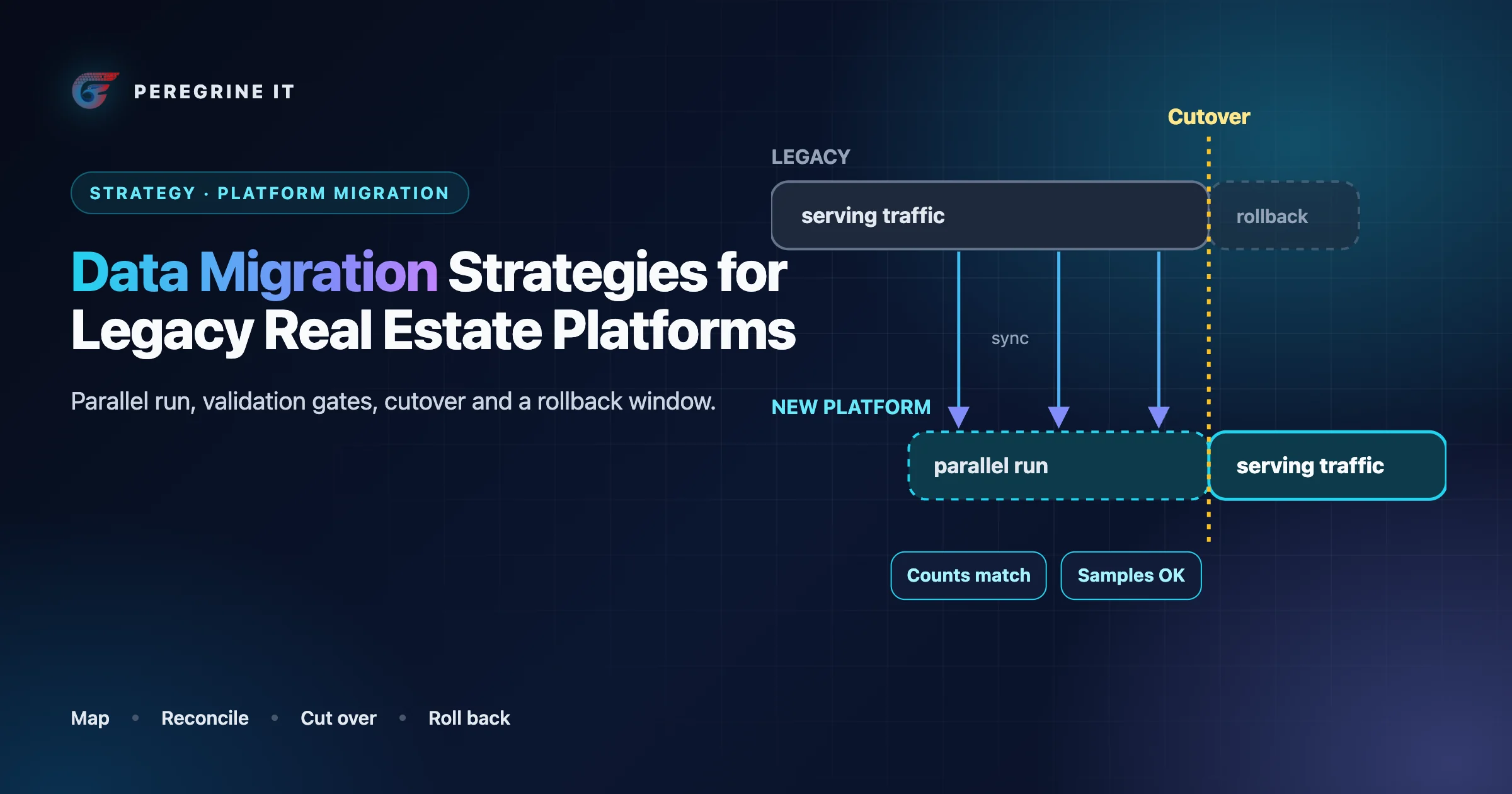
The timeline as a list:
- Backfill. The legacy system serves all traffic. Its data is bulk-copied into the new system through the transformation code.
- Sync and verify. Changes flow continuously from legacy to new, by CDC or dual writes. The new system receives shadow reads. Three verification gates must pass: counts, checksums and sampled records.
- Cutover. Freeze writes, let the final changes drain, run the gates one last time, arm reverse sync, switch traffic and turn on redirects.
- Rollback window. The new system is the source of truth. Changes are synced back to the legacy system, which stands by read-only, so a return loses nothing.
- Retire. When the window closes, reverse sync stops, rollback is no longer possible and the legacy system is archived.
- Throughout, listing data follows its own lane: a fresh import from the MLS feed into the new system, then incremental sync. It is never copied from legacy.
Mapping and transformation
The transformation code is the part of the migration that is actually software. Four rules keep it honest.
Keep a permanent id map. Every migrated row records where it came from. The map is what makes the load repeatable, lets foreign keys be re-pointed, powers the URL redirects and answers support questions a year later. An illustrative shape:
-- Illustrative. One row per migrated record.
CREATE TABLE migration_id_map (
  entity         text        NOT NULL,   -- 'user', 'lead', 'saved_search', 'agent', 'page'
  legacy_id      text        NOT NULL,
  new_id         uuid        NOT NULL,   -- several legacy ids may share one when duplicates are merged
  tenant_id      uuid        NOT NULL,
  source_hash    text        NOT NULL,   -- hash of the legacy row as last migrated
  migrated_at    timestamptz NOT NULL,
  run_id         text        NOT NULL,
  PRIMARY KEY (entity, legacy_id)
);
Make every load repeatable. A loader looks up the map, inserts when the legacy id is new and updates when the source hash has changed. Then the backfill, the continuous sync and a re-run after a bug fix are the same code path.
Write the mapping down as a table people can review. One row per target field: source field, transformation, default, and what happens to values that do not fit. The rows that need a business decision (two accounts with one email, a lead with no agent, a status the new system does not have) are found here, weeks before cutover, and decided by someone who owns the outcome.
Quarantine, do not drop. A row that fails transformation goes to a rejects table with its reason. The count of rejects by reason is a progress report in itself, and it must reach zero or an agreed, written exception list before cutover.
Watch the usual technical edges as well: time zones (legacy systems often store local time with no zone), text encodings, free-text fields that became enumerations, soft-deleted rows, and orphans whose parent was deleted long ago.
Validation and reconciliation
“The script finished without errors” is not evidence. The three gates in the diagram are three levels of proof, each catching what the previous one cannot.
- Counts. Rows per entity, per tenant, and per meaningful group (leads by status, users by role, saved searches by active flag). Totals alone hide offsetting errors; grouped counts expose them. Every difference is explained by the rejects table or it is a bug.
- Checksums. For each entity, compute a hash over the fields that should survive unchanged, in a canonical form, on both sides, and compare by key. This finds truncated text, shifted timestamps and mangled characters that counts never will.
- Sampled record comparison. Take a random sample and a deliberate sample (the oldest records, the largest accounts, the known odd cases) and compare them through the application: log in as the user, open the lead, run the saved search. Fields the migration converts can only be checked this way, because their hashes are supposed to differ.
An illustrative checksum query in PostgreSQL syntax, run on each side and compared by key:
-- Illustrative. Same projection on both systems, keyed by the legacy id.
-- Every field is wrapped in coalesce: concat_ws skips NULLs, which would let
-- (NULL, 'x') and ('x', NULL) produce the same hash.
SELECT legacy_id,
       md5(concat_ws('|',
           coalesce(lower(trim(email)), ''),
           coalesce(phone_e164, ''),
           -- created_at is timestamptz on both sides; compare it in UTC
           coalesce(to_char(created_at AT TIME ZONE 'UTC', 'YYYY-MM-DD"T"HH24:MI:SS'), ''),
           coalesce(assigned_agent_legacy_id, '')
       )) AS row_hash
FROM   leads_for_comparison
ORDER  BY legacy_id;
Tools can do the row comparison for like-for-like copies. AWS DMS documents a validation feature that compares each row in the source with its corresponding row at the target, verifies the rows contain the same data, and reports any mismatches. It does not know your business rules, so add invariants of your own: every lead belongs to exactly one tenant, every saved search has an owner who can log in, no agent has two profiles, every favorite resolves to a listing or is marked historical.
Finally, shadow reads: during the parallel run, send a copy of real read requests to the new system and compare the answers, so the test uses the queries users actually make. Run all of these continuously, not once at the end. A gate is a query that returns zero rows.
URL preservation and redirects
If the URL scheme changes at all, Google treats it as a site move with URL changes, and its guidance is specific:
- Prepare a URL mapping from the current URLs to their corresponding new format. Build the list of old URLs from your sitemaps and from server logs or analytics for the URLs that get the most traffic.
- Use HTTP permanent redirects if possible, such as 301 and 308, set up on the server.
- Avoid chaining redirects; redirect to the final destination directly.
- Do not redirect many old URLs to one irrelevant destination, such as the home page, which Google says may be treated as a soft 404.
- For content that is not moving, return an HTTP 404 or 410.
- Keep the redirects for as long as possible, generally at least 1 year.
- Expect temporary fluctuation in site ranking during the move, and time the move to coincide with lower traffic, if possible.
For a real estate site the mapping has four families, and they are handled differently:
- Listing pages. Old listing URLs usually contain the old internal id or the MLS number. Map them through the listing's stable identity to the new URL. This is a rule plus a lookup, not a static table, because listings keep changing. A URL for a listing that is no longer available gets the treatment in handling deleted, expired and sold listings: Google's instruction is to return a 404 or 410 when there is no replacement, not to redirect to search results.
- Area, neighborhood and building pages. A finite list. Map one to one and check every row.
- Agent and office pages. Map through the id map; agents who have left go to their office page only if that is a real replacement.
- Search URLs with query strings. Saved in emails and bookmarks. Translate the parameters that matter and drop the rest; test the most frequent patterns from the logs.
Test the redirect map before launch by replaying the old URL list against the new system and recording the status and final destination of each. After launch, watch the 404 log daily for the first weeks; it is the list of mappings you missed. Google also warns that after a move it will temporarily crawl the new site more heavily than usual, so size the new system for that.
Rollback planning
A rollback plan is a decision made in advance about data, not a hope that the old servers still boot. Four things define it.
- Where new writes go. From the moment the new system accepts writes, returning to the old one loses them unless they are synced back. Reverse sync is the price of a clean rollback. If it is not built, say so plainly: the plan is then “fix forward”, and the gates before cutover must be stricter.
- The window. A fixed period, agreed beforehand, during which the legacy system is kept current and can take traffic again. It ends on a date, with a named person deciding to close it.
- The triggers. Written conditions that cause a rollback without debate: a gate failing after cutover, logins failing above a threshold, leads not reaching agents, alerts sending wrongly.
- What does not roll back. Emails already sent, redirects that search engines and browsers have already seen, changes in third-party systems, and the MLS-side configuration of the new feed. List them, so nobody expects a rollback to undo them.
Rehearse the rollback as well as the cutover: switch to the new system, write test data, switch back, and confirm the data arrived in the legacy system.
Cutover runbook
A runbook is a numbered list with an owner, an expected duration and a verification for every step. The outline below is a starting point for a parallel-run cutover; durations come from your rehearsals.
- Days before: the MLS import in the new system is complete and syncing; gates have been green for an agreed period; redirects are tested against the old URL list; a full rehearsal, including rollback, has been run on production-sized data.
- Announce the window to agents and staff. Lower DNS time-to-live values if DNS will change.
- Pause side effects in both systems: alert email, drip campaigns, lead routing notifications, outbound webhooks.
- Freeze writes on the legacy system (maintenance mode for forms and logins; public pages stay readable).
- Drain: wait for replication lag or the dual-write queue to reach zero.
- Final gates: counts, checksums, invariants. Bring sequences and counters in the new database up to date.
- Go or no-go, decided by the named owner against the written criteria. A no-go here costs only the unfreeze.
- Arm reverse sync from the new system to the legacy one before any traffic moves, so the first write the new system accepts is captured. The legacy system stays closed to user writes.
- Switch traffic to the new system and enable redirects.
- Smoke tests through the public site: log in as a test user, submit a lead and confirm it reaches the right agent, run a saved search, open a listing, follow ten old URLs.
- Resume side effects one at a time, alert email last, after checking that the first batch is the size you expect.
- Watch error rates, the 404 log, login failures, lead flow and sync lag for the MLS feeds through the rollback window.
- Close the window: stop reverse sync, take a final archive of the legacy data under your retention policy, remove legacy copies of MLS data as your license requires, and decommission.
The case study mentioned above reports one more step worth copying: the full stack was load-tested with simulated 200-agent traffic before go-live.
Frequently Asked Questions
Should listing data be migrated from the old platform?
Usually not. Listings are licensed data: Trestle’s documentation says that for multiple listing data the MLO is the copyright holder and data licensor. Run a fresh import from the MLS feed into the new system, and migrate only your references to listings (favorites, inquiries), re-keyed to the originating MLS and listing key.
What is the difference between dual writes and change data capture?
With dual writes the application sends each change to both systems. With change data capture the database reports its own changes, for example through PostgreSQL logical replication or MongoDB change streams. Dual writes need no database feature but can leave the systems inconsistent when one write fails; both approaches need reconciliation checks.
How do you verify that a data migration is correct?
In three levels: grouped row counts per entity and tenant, checksums over unchanged fields compared by key, and sampled records compared through the application. Add business invariants and, during a parallel run, shadow reads. Each check should be a query that returns zero rows when the data is right.
How long should redirects from old URLs be kept?
Google’s guidance for site moves is to keep the redirects for as long as possible, generally at least 1 year. It also advises against redirecting many old URLs to one irrelevant page such as the home page.
Can user passwords be migrated?
The hashes can; the passwords themselves cannot be recovered. If the old hashing algorithm is weak, OWASP describes re-hashing when the user next logs in, or wrapping the existing hashes by using them as inputs for a more secure algorithm.
Search guidance, database documentation, OWASP guidance and MLS platform documentation were read from the linked pages on October 13, 2026. MLS license terms differ by MLS and agreement; MLS Grid and Trestle are cited as published examples, and your own agreements decide what may be copied or retained. SQL blocks are illustrative.
Planning a move off a legacy platform? See our SaaS development service. Every project starts with a 30-minute technical discovery call with an engineer.
