The problem: a listing ends in more ways than it begins
A listing enters your system one way: it appears in the feed. It can leave in at least six, and only some of them arrive as an update. It can go under contract, close, expire, be withdrawn or canceled, be deleted at the MLS, or simply stop being distributed to you while it is still active for everyone else. A site that handles only “status changed to Closed” will, sooner or later, advertise a home that is not for sale, send an alert for it, and keep a page for it in Google. In our real estate SaaS case study, one of the four problems found in the audit was exactly this: sold and active properties lived in one collection with no clear status management, and agents were showing sold properties as active on their sites.
What follows takes each ending in turn: what the pipeline, the search index and the web page should do, and which questions only your MLS license can answer. For where this sits in the whole system, see the MLS data pipeline reference architecture.
Two status fields, and they are not the same on every MLS
The RESO Data Dictionary gives every listing two statuses. StandardStatus is a locked lookup with 11 values. MlsStatus is a local or regional status that is well known by business users, defined as an open enumeration: any value is allowed. The link between them is one rule: each MlsStatus must map to a single StandardStatus, and several may map to the same one.
The standard values that matter for a listing's ending, as RESO defines them:
| StandardStatus | RESO definition | Organizations using the value |
|---|---|---|
| Active | On market and an offer has not been accepted | 96% |
| Active Under Contract | An offer has been accepted but the listing is still on market | 54% |
| Pending | An offer has been accepted and the listing is no longer on market | 92% |
| Closed | The purchase agreement has been fulfilled or the lease agreement has been executed | 77% |
| Expired | The listing contract has expired | 77% |
| Withdrawn | Withdrawn from the market, but a contract still exists between the seller and the listing member | 71% |
| Canceled | The listing contract has been terminated | 52% |
| Delete | The listing contract was never valid, or there is another reason for the contract to be nullified | 21% |
Definitions and usage figures are from the StandardStatus page of the Data Dictionary, generated October 12, 2026, which reports usage across 420 organizations. The other three values are Coming Soon, Hold and Incomplete.
The right-hand column is the point of the table. About half of the organizations measured use Canceled and Active Under Contract; about a fifth use Delete. So code that waits for StandardStatus = 'Delete' cannot be the only removal path, and a board without Active Under Contract may be expressing that state some other way, for instance through MlsStatus. Three working rules follow:
- Drive logic (search filters, counts, page treatment) from StandardStatus. Show MlsStatus where the board's own wording matters to agents.
- Store both, and store the mapping you observed per originating system. When a pair appears that you have not seen, flag it; do not guess. MLS data normalization across boards covers the mapping layer.
- Treat an unknown or missing status as not displayable until someone has looked at it. Showing a listing you should not is the worse error.
Three ways a removal reaches you
1. A flag on the record (MLS Grid)
MLS Grid implements deletion as a boolean on every record. Its documentation says MlgCanView indicates whether the record should be kept in your database or not, and that when it changes to false the record is no longer valid for the feed type you consume and must be removed from your local data store. Two details decide the design:
- False does not mean deleted. The reasons MLS Grid lists include the property was deleted, the listing office decided not to feed out its listings, and the property changed status and became unavailable in IDX. On an IDX feed, then, an expiry or a withdrawal may never arrive as a status at all. It arrives as MlgCanView false, and your record's last known status stays Active. Do not infer the reason.
- The flag has a window. After 7 days, records marked MlgCanView false are removed from the data feed entirely. A consumer that was offline for longer never sees those removals.
The flag only reaches a query that does not filter on it; the sync engine article covers that handoff from initial import to replication.
2. Nothing at all (Trestle, and hard deletes generally)
Trestle documents the opposite model. Its incremental updates catch new and changed records, but will not provide information on records that are no longer available. To find listings that are off-market, deleted or no longer being distributed on the Internet, the consumer must query for all of the keys for the resource and remove any records that do not match. The record just stops existing. RESO describes this as the general state of timestamp replication: consumers usually implement reconciliation processes that run daily to query by all keys.
3. An ordinary status change
Where the license includes off-market records, a listing moves to Pending, Closed, Expired, Withdrawn or Canceled as a normal update with a new ModificationTimestamp. This is the easy case, and it is the one most code is written for. Whether you receive these at all depends on the feed type and the MLS: MLS Grid's IDX rules say expired and withdrawn listings may be excluded from MLS Grid data.
A pipeline has to handle all three: the second is also what a missed flag looks like after an outage.
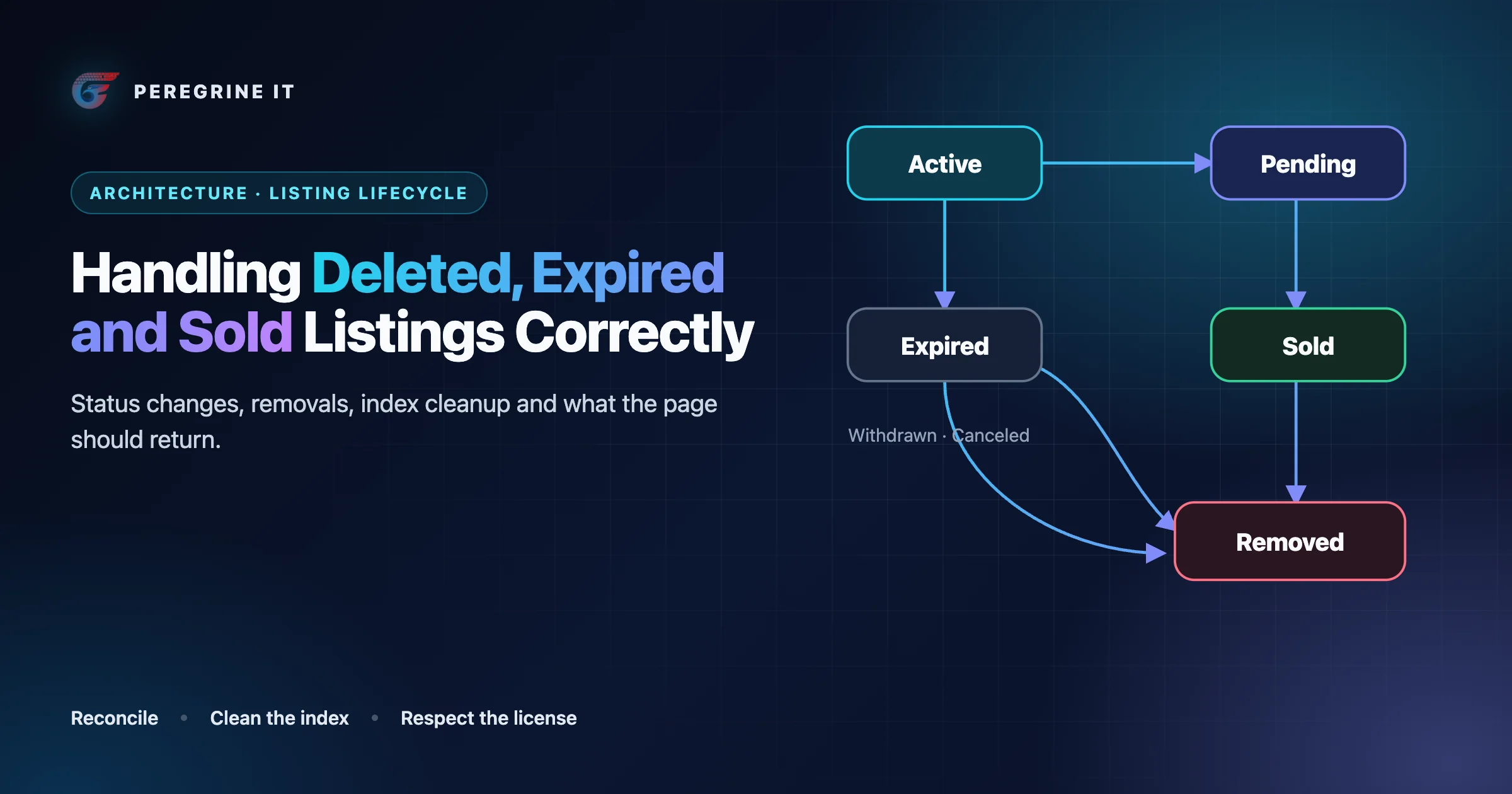
The lifecycle as a state machine
The same diagram as a list of transitions and actions:
- First seen in the feed, to Active: index it, serve the page with a 200, match it against saved searches.
- Active to Pending (offer accepted): re-index with the new status; the page stays up with the status shown. Pending back to Active (back on market): re-index. It is a status change, not a new listing.
- Pending to Closed (sale closes): take it out of active search; keep it as a sold record only if the license allows.
- Active to Expired (term ends) or to Withdrawn or Canceled: take it out of active search; the page is treated according to the license. Either can return to Active if the same record is relisted or put back on market.
- Any state, Active and Pending included, to Removed (MlgCanView false, a Delete status, or the key missing at reconciliation): delete it from the store and the index, purge the cached page, cancel pending alerts, and return 404 or 410 for its URL.
Implement the transitions in one place: a function that takes the previous and the new state of a record and returns the actions. Search, page rendering, alerts and the sitemap then read the result, instead of each holding its own idea of what “active” means.
Decision table: status, index, page, license
The first two columns are our recommended defaults. The page column follows Google's documentation, cited in the section after the table. The last column is the question to put to your MLS agreement; the examples are from MLS Grid's IDX Rules, updated September 17, 2026, and apply only to the MLSs they name.
| Status or signal | Index action | Page treatment | License question |
|---|---|---|---|
| Active | In the active index | 200, full listing | Which fields and which attribution must be shown |
| Active Under Contract, Pending | In the active index with a status facet; let users exclude it | 200, status shown next to the property details | Is this status in the feed for your use, and must it be labeled? MLS Grid requires the status of the listing immediately adjacent to the property information |
| Closed | Out of the active index; into a separate sold index if permitted | 200 with sold content if display is permitted; otherwise 404 or 410 | May sold listings be shown, for how long, and with which fields? Examples: closed listings more than three years old may not be displayed (REcolorado, IRMLS); no sale price, and only the primary photograph (Unlock) |
| Expired, Withdrawn | Out of the active index | 404 or 410 unless display is permitted and the page has real content | MLS Grid: display may be prohibited by the participant's governing documents; if such listings are in the IDX data, display is authorized except where the rules state otherwise. SCKMLS prohibits display of both, and Northwest MLS of expired listings |
| Canceled, Hold or a local off-market status | Out of the active index | 404 or 410 by default | Named per MLS. Example: Heartland MLS prohibits display of Temporarily Off Market and Cancelled listings |
| MlgCanView false | Delete from every index in the same job | 404 or 410; purge the cached page | None to ask: the record must be removed from your local data store |
| Key missing at reconciliation | Delete from every index after the safety checks below | 404 or 410; purge the cached page | How soon removed data must leave your displays. MLS Grid: refresh at least once every twelve (12) hours, to exclude data that has been removed |
| Unknown or unmapped status | Hold out of the index; alert | Not served until mapped | Ask the MLS what the status means for display |
What the web page should return
Google's documentation gives three outcomes for a page whose content has gone, and a listing fits each of them at different times.
- The listing is gone and nothing replaces it: 404 or 410. Google's instruction is to return a 404 (not found) or 410 (gone) response code when a page is removed and there is no replacement with similar content. The two are equivalent for Search: all 4xx errors, except 429, are treated the same, and already indexed URLs that return a 4xx are removed from the index. We would still send 410 for a URL known to have existed, because it is the accurate answer for other clients.
- The listing changed state and you may still show it: 200 with real content. A sold page with the status, the permitted sold details and the required attribution is a page. A 2xx response may be considered for indexing, with no guarantee.
- There is a clear replacement: 301. Google says to redirect when a page has moved or has a clear replacement on your site, and treats a permanent redirect as a signal that the redirect target should be canonical. For listings this is narrow: the same property under a changed URL scheme, or, as a judgment call, the same property relisted under a new record. A search-results page or the home page is not a replacement for a specific home.
The outcome to avoid is the fourth one, which is the most common in practice: a 200 page that says “this listing is no longer available”. Google defines a soft 404 as a URL that returns a page telling the user that the page does not exist and also a 200 (success) status code, and says such pages are excluded from Search. You can and should make the 404 useful to a visitor, with nearby and similar active homes; Google notes that custom 404 pages are created solely for users, so the server should still return a 404 status code.
Two implementation traps deserve a mention. In the Next.js App Router, calling notFound() before the response starts streaming returns a 404, but if streaming has begun the response keeps its 200 status and Next.js adds a noindex tag. Resolve the listing's state before anything streams. And a statically generated or cached page does not know the listing has gone: the removal job must invalidate it, for example with revalidatePath, which invalidates cached data on demand for a specific path, and purge any CDN copy.
Google also supports an unavailable_after rule: do not show this page in search results after the specified date and time. It suits pages with a known end date, such as an open house. A listing's end is rarely known in advance, so the rule does not replace the status code. The wider indexing picture for listing sites is in SEO, AEO and GEO for real estate websites.
The reconciliation job
Reconciliation is a separate job from incremental sync, on its own schedule. We would run it on every platform: it is the only removal mechanism on some and the safety net behind a flag on others. An illustrative outline:
// Illustrative. Runs per feed, originating system and resource.
async function reconcile(key) {
  const startedAt = now()
  const remote = new Map()                       // record key -> { modified }
  let complete = false
  for await (const page of feed.listKeys(key)) { // key fields only; throws if any page fails
    for (const r of page.records) remote.set(r.key, r)
    complete = page.isLast                       // true only when the response had no next link
  }
  // Never diff a partial or empty list: every key not fetched would look deleted.
  if (!complete || remote.size === 0) return abort('incomplete key list')

  const local = await store.keysFor(key)         // records we hold as displayable
  const missing = local.filter(k => !remote.has(k.key) && k.firstSeenAt < startedAt)
  const stale   = local.filter(k => remote.has(k.key) && remote.get(k.key).modified > k.modified)

  if (missing.length > local.length * MAX_REMOVAL_FRACTION) {
    return alert('removal count above threshold; held for review', missing.length)
  }
  for (const k of missing) await lifecycle.apply(k, { signal: 'KEY_MISSING' })
  await sync.refetch(key, stale)                 // drifted records go back through normal sync
  await checkpoints.markReconciled(key, startedAt)
}
Four decisions in that outline are worth stating:
- Key-only queries. Trestle allows a query that selects only key fields to return up to 300,000 records, and points to its replication endpoint for resources of more than a million. MLS Grid's documentation does not describe a reconciliation query. It does support
$select, so the equivalent we would propose is to page through the resource with the initial-import filter (MlgCanView equal to true), selecting the key and the timestamp. Agree the schedule with MLS Grid support first, since a repeated full pull is the kind of usage its guidelines exist to limit. - Never act on a partial list. If the key download fails halfway, every key not yet fetched looks deleted. The job diffs only after a page with no next link, and treats an empty list as a failure.
- A removal threshold. If the diff wants to remove more than a set fraction of a feed, stop and ask a person: either the feed has a problem or the license scope changed. The fraction is a setting to tune per feed, not a number we can give you.
- Drift as well as absence. Selecting the timestamp with the key finds records whose stored copy is older than the feed's, which catches updates lost to a past bug. Those are re-fetched through the normal path, not patched in place.
How often to run it follows from the license, not from convenience. Where a refresh rule such as MLS Grid's twelve hours applies and reconciliation is the only way removals reach you, we would have the job complete well inside that period. After any outage longer than the platform's flag window, run it before trusting incremental sync again. RESO's ratified EntityEvent resource would put removals in the normal stream, since events are produced when records are no longer part of a user's feed; until your provider offers it, reconciliation stays.
Cleaning up everything derived from the record
Deleting the row is the smallest part of a removal. The listing also lives in every copy made from it:
- Search index. Delete the document in the same job that applies the removal, not in a later batch. In Elasticsearch a change becomes visible to search at the next refresh, and by default the engine refreshes indices every second, but only on indices that have received a search request in the last 30 seconds.
- Query caches. A cached result set still contains the listing until it expires. Either keep cache lifetimes shorter than your refresh obligation, or filter cached results against the store before rendering.
- Rendered pages and the CDN. Invalidate the listing page, and any area or building page that lists it.
- Media. Remove your stored copies of the photos on the same trigger, unless the license permits keeping them for a sold display.
- Sitemap. Drop the URL at the next generation, so you are not asking search engines to crawl a 404.
- Alerts and saved lists. Cancel queued notifications for the listing, and decide what a user's favorites list shows for a home that is gone. Saved searches and listing alerts covers the notification side.
- Embeddings and AI features. A vector index is a copy too. It must be removed with the record, and whether you may build one at all is a license matter.
Because per-record deletes can be missed, verify in bulk as well: compare the document count in the index with the count of displayable rows in the store, per originating system, on a schedule. And rebuild the index from the store periodically behind an alias. Elasticsearch's alias API can perform multiple actions in a single atomic operation, so the swap to a clean index is not visible to users, and anything orphaned in the old one disappears with it.
One design question is whether to keep a tombstone. MLS Grid's wording is that the record must be removed from your data store, and we read a soft-delete flag on the full record as not meeting it. What we would keep is a minimal tombstone: the key, the removal time and the signal, with no listing content. It lets the site answer 410 for a URL that once existed, stops a late-arriving job from recreating the record, and gives support a way to answer “where did this listing go”. Confirm even that against your agreement.
Sold and historical records are licensed data
It is tempting to treat sold listings as your own archive once they are in your database. Treat them as licensed data instead: what you may show is written per MLS. The decision table above quotes the age and field limits that MLS Grid's public IDX rules set for REcolorado, IRMLS and Unlock participants. The same document adds, for SCKMLS participants, that display of Sold Price and Net Sold Price on closed listings is prohibited, and that when a sold listing is displayed the name of the cooperating brokerage or a stated disclaimer must also appear. None of this generalizes beyond the MLSs named. Rules of this kind have three engineering consequences.
Rules are data, keyed by originating system. An illustrative shape:
// Illustrative. Values must come from each MLS's current rules and your license.
const displayPolicy = {
  'mls-a': { offMarket: ['Closed'],            closedMaxAgeDays: 1095, closedHide: [],            closedPhotos: 'all' },
  'mls-b': { offMarket: ['Closed'],            closedMaxAgeDays: null, closedHide: ['ClosePrice'], closedPhotos: 'primary' },
  'mls-c': { offMarket: [],                    closedMaxAgeDays: null, closedHide: [],            closedPhotos: 'all' },
}
Some transitions are caused by the calendar, not the feed. A closed listing under a three-year limit becomes non-displayable on a date, with no update arriving to trigger it. The lifecycle therefore needs a scheduled job that evaluates age-based rules and applies the same removal actions as any other transition. Without it, compliance decays silently.
Feed type decides what you hold at all. MLS Grid marks each record with the uses it qualifies for, and records that contain only the VOW value cannot be used for IDX. Sold data offered to registered users under one program is not automatically displayable on public pages under another. The display-policy filter has to know the surface as well as the status.
Rules change, too: the document cited here carries an update date of September 17, 2026. Keep the policy versioned and re-run it over stored records whenever it changes.
Checks that prove it works
- Request the URL of a removed listing and read the status code: 404 or 410, not 200.
- Search for a removed listing by address and by listing number: no result in search, autocomplete or map pins.
- Count displayable rows in the store and documents in the index per originating system: equal.
- For each board, query your store for statuses its rules prohibit: zero displayable rows.
- Query for closed listings older than each board's limit: zero displayable rows.
- Simulate an outage longer than the flag window, then confirm reconciliation removes what incremental sync missed.
- Feed reconciliation a truncated key list: it must abort, not delete.
Frequently Asked Questions
Should a sold listing page return 404 or stay live?
It depends on your MLS license. If you may display sold listings and the page has real content, keep it at 200 with the status shown. If not, Google says to return a 404 (not found) or 410 (gone) response code. A 200 page that only says the listing is unavailable is a soft 404.
Is there a difference between 404 and 410 for removed listings?
Not for Google Search, which says all 4xx errors, except 429, are treated the same. A 410 is the more accurate answer for a URL you know existed, which is one reason to keep a minimal record of removed keys.
Do all MLSs use the same listing statuses?
No. RESO’s StandardStatus has 11 locked values, but its Data Dictionary shows that not every organization uses every value, and MlsStatus is an open enumeration: any value is allowed. Store both fields and the mapping between them for each MLS.
How long can sold listings be displayed?
Only as long as each MLS allows. As one published example, MLS Grid’s IDX rules state that for REcolorado participants display of closed listings more than three years old is prohibited. Other MLSs set different limits or none; your license decides.
Status definitions, platform behavior, MLS Grid rules and Google guidance were read from the linked pages on October 12, 2026, and checked again the next day. MLS rules are quoted from MLS Grid's public IDX Rules as a worked example and apply only to the MLSs named in them. Rules change and differ by MLS and by feed type; your license and the current documents decide. Code and configuration blocks are illustrative.
Need status handling that holds up to an MLS audit? See our MLS and IDX integration service. Every project starts with a 30-minute technical discovery call with an engineer.
