The short answer
An MLS integration is a replication system, not a set of API calls. RESO describes the pattern: replicators initially pull an entire data set, and then continually request the most recent data changes. A design that holds up has nine parts: a connector per feed, replication jobs with a stored cursor, a raw store, normalization to the RESO Data Dictionary, a separate media worker, a canonical store, duplicate linking across boards, a display-policy filter, and a search index that can be rebuilt. Compliance and monitoring are attached to specific stages, not added at the end.
This guide is the design reference. For what changes between RETS and the Web API, see RESO Web API vs RETS; for licenses and approval, see how to get MLS data access.
The reference architecture
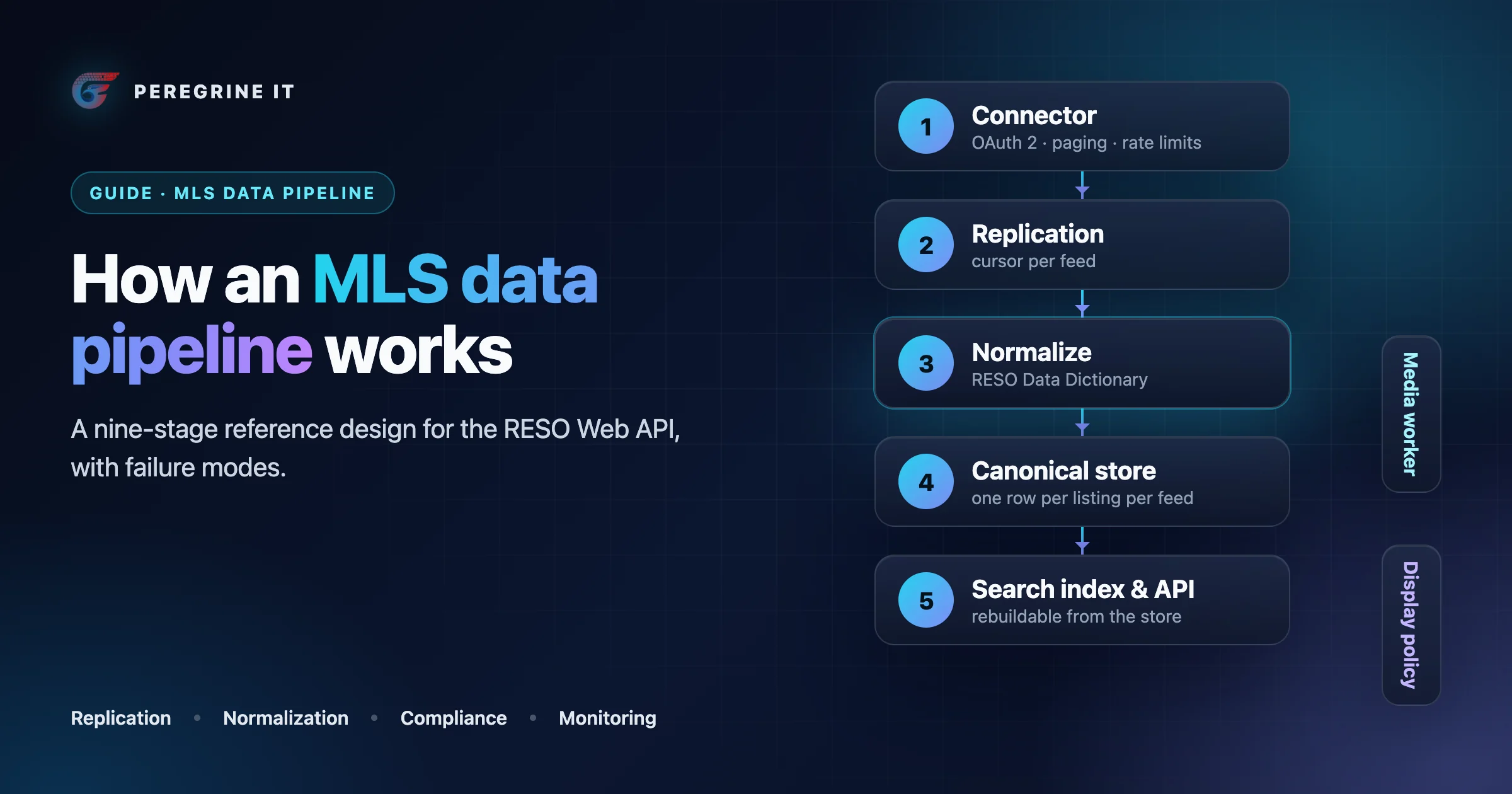
The same architecture as a list:
- Connector. One connector per feed holds the credentials, follows the server-driven paging links and keeps requests under that platform’s rate limits. Monitoring signal: HTTP 429 and error rate per feed.
- Replication. Three jobs share one cursor per feed and resource: the initial load, the incremental sync on ModificationTimestamp, and the reconciliation pass that finds records the feed no longer carries. Compliance checkpoint: removals applied inside the refresh window. Monitoring signal: sync lag: now minus the newest timestamp received.
- Raw store. Every record is saved as received, with its feed, originating system and license type, so mappings can be re-run without re-downloading. Compliance checkpoint: license scope recorded per record.
- Normalize. Field names and lookup values are mapped to the RESO Data Dictionary; local fields are kept under their own namespace. Monitoring signal: unmapped fields and lookup values.
- Media worker. A separate queue downloads each photo once into your own storage and serves it from there, never from the source URL. Compliance checkpoint: no display from source media URLs. Monitoring signal: media queue depth and failures.
- Canonical store. The system of record holds one normalized row per listing per originating system, keyed by originating system and listing key. Monitoring signal: record count against the feed’s count.
- Link duplicates. Listings of the same property from different boards are linked into a group; neither record is deleted. Monitoring signal: duplicate-group rate per market.
- Display policy. A filter applies seller opt-outs, the license scope of each surface and the attribution each board requires before anything reaches search or a page. Compliance checkpoint: display rules enforced before the index.
- Search index and API. The search index and the API are derived from the canonical store and can be rebuilt from it; websites, apps and CRMs read from here. Monitoring signal: index count against the store.
Two properties matter more than the choice of database. First, every stage after the raw store can be re-run from stored data, so a mapping fix or a rule change does not need a new download. Second, each feed runs on its own: its own credentials, cursor, queue and error budget, so one board's outage does not stop the others.
1. Connector: authentication, paging and rate limits
The transport is fixed by the standard. The RESO Web API uses the OAuth2 Bearer Token and Client Credentials standards for authorization, requires TLS 1.2 or above, and says providers must support server-driven paging using @odata.nextLink. So the paging loop is the same everywhere: request, store, follow the next link until there is none.
What differs per platform is the budget, and the connector has to enforce it:
- Tokens. A Trestle token is good for up to 8 hours, and Trestle recommends caching the token and its expiration and refreshing it only when necessary. MLS Grid issues long term tokens from its web application.
- Request limits. MLS Grid allows no more than 2 requests per second, 7,200 requests in any hour, 4 GB downloaded in any hour and 40,000 requests per 24-hour period. Trestle's baseline is 7,200 queries per hour and 180 queries per minute.
- What happens when you exceed them. On MLS Grid a suspended token receives an HTTP 429 error in response to any requests until usage falls back within the limits. Trestle also answers with 429 and recommends an exponential wait between retries.
- Concurrency. MLS Grid tells consumers not to send more than one replication request at a time, because replication requests must be in sequential order. Parallelism belongs across feeds, not inside one.
In practice: one worker per feed and resource, a token-bucket limiter set below the published limit, and backoff that treats 429 as a signal to slow the whole feed rather than to retry one request.
2. Initial replication
The first load is the largest job the pipeline will run, and it should be resumable. MLS Grid's guidance is explicit: order is by ModificationTimestamp, so after an error you continue where you left off by adding the ModificationTimestamp that you last received to the query. It asks for the initial query to filter on MlgCanView equal to true, so deleted records are not loaded, and for a single OriginatingSystemName in every request, which means one load per MLS. A request returns at most 5,000 records, or 1,000 when $expand is used. Its best-practices guide also says to ask support for a grace period in advance if the initial import will exceed the normal limits.
Trestle works differently at volume. A normal query returns a maximum of 1,000 records; for more than 1,000,000 records you need the replication endpoint. That endpoint is not resumable: if the process fails part way through, you have to restart it, and its links expire after 5 minutes of inactivity. Write each page to the raw store as it arrives so a slow downstream step can never stall the download.
3. Incremental sync and removals
After the first load, each run asks for records changed since the cursor. Three details decide whether the copy stays correct.
The cursor is a value you received, not your clock. Trestle recommends tracking the latest value you received, so clock differences do not cause you to miss updates. MLS Grid says the same, and adds that if you store only part of the data, the cursor must still be the greatest ModificationTimestamp you have received, whether or not you store the record. It also warns against range queries on ModificationTimestamp: use “greater than the cursor” only.
Know whose timestamp it is. On MLS Grid, ModificationTimestamp is the time the record was modified by MLS Grid; the MLS's own time is in OriginatingSystemModificationTimestamp. On Trestle a record's timestamp can move because mappings or enumerations that affect it were updated, not only because the listing changed. Both mean a large batch of “changes” can arrive with no agent having touched a listing. Trestle names this directly: being prepared for mass updates is important.
Removals do not arrive the same way on every platform. MLS Grid flags them: when MlgCanView changes to false, the record must be removed from your local data store, and after 7 days such records are removed from the feed entirely. A sync that is down for longer than that will never see those removals, so it needs a full comparison when it comes back. Trestle's incremental feed does not report removals at all; you query for all of the keys and remove any records that do not match, and a key-only query can return up to 300,000 records at a time.
How often to run is a platform answer too. MLS Grid says a replication request once every 15 minutes is sufficient; Trestle suggests every few minutes to every hour. RESO has ratified an event-based alternative to timestamp polling, the EntityEvent resource, with a sequence number that can only increase, which removes the timestamp problems above where a provider offers it.
4. Media
Photos need their own design, and on MLS Grid the rules changed in 2026:
- You must maintain your own copy of all media files, and the URLs are only for downloading a local copy, not for use on your website or in your application.
- From September 8, 2026, media is served from media.mlsgrid.com with URLs that are signed, single-use and expire one hour after they are generated. A second download attempt within the hour returns a 429 error.
- Every media download must send a User-Agent header whose value is your OAuth 2 access token, required from June 1, 2026.
- Media is never edited in place: a change issues a new MediaKey and Media URL, and PhotosChangeTimestamp on the listing tells you the set changed.
Those four facts dictate the design. The media worker takes the URL from the replication response and downloads straight away, inside the hour; it never stores a URL to fetch later. A failed download is retried by asking the API for the record again, not by replaying the URL. Work is keyed by MediaKey, so a photo is fetched once and a missing key means a deletion.
On Trestle, media URLs have their own quota of 18,000 requests per hour and 480 per minute, separate from data queries. Trestle notes this suits downloading primary photos first and secondary photos when they are requested. Either way, media runs on its own queue with its own limiter, so a backlog of photos cannot delay price and status changes.
5. Normalization to the Data Dictionary
The target schema is the RESO Data Dictionary. DD 2.0 is the current version for RESO certification, with 41 resources, 1,745 fields and 3,683 lookups; a 2.1 draft is in development. A platform that converts for you still leaves work:
- Names are converted, values mostly are not. MLS Grid's conversion concerns itself with field names and, where applicable, Data Dictionary lookups. Anything else arrives as the MLS wrote it.
- Local fields survive. MLS Grid keeps non-conforming fields and prefixes them to identify which MLS they come from. Store them in a per-MLS namespace instead of dropping them: a field dropped today has to be re-imported to add later.
- Records are sparse. On MLS Grid each record contains only the fields converted from its originating MLS. A missing field is normal, not an error.
- Time zones are mixed. Date fields converted to a Data Dictionary field are in UTC; dates passed through as local fields keep their original representation.
- Status needs two fields. StandardStatus is a locked list of 11 values. MlsStatus is the local status, and each MlsStatus must map to a single StandardStatus. Filter and count on the first; show the second where the board's wording matters.
Keep the mapping as versioned configuration per originating system, and expect it to be replaced. When MARIS moved to a new MLS system, MLS Grid published it under a new OriginatingSystemName and told every consumer to run a new initial import, with new local-field and key prefixes. A pipeline that treats “one MLS” as a fixed schema has to be rewritten for that; one that treats each originating system as a loadable source just adds a source and retires the old one.
6. Identity and duplicates across boards
Three identifiers do three jobs. ListingKey is a unique identifier for the record from the immediate source. ListingId is the number people quote, and RESO warns that in a merged system it may not be unique. OriginatingSystemKey is the key from the system with authoritative control over the record. The primary key of the canonical store is therefore the pair of originating system and key, never the listing number alone. On MLS Grid, key fields carry an MLS prefix that should be removed before displaying externally but added back when requesting records, so store both forms.
The harder problem is one property listed in two MLSs. RESO's answer is the Universal Parcel Identifier, created so that property data does not depend on addresses and standalone parcel numbers for identification. But the Data Dictionary page for UniversalPropertyId shows usage adoption of 21%, 90 of 420 organizations, so you cannot rely on it being present. A workable order of evidence:
- UniversalPropertyId, where both records carry it.
- Parcel number plus county or region.
- A normalized address (unit included) plus coordinates within a small distance.
- Listing-level agreement as a tie-breaker: same listing office, price and status dates.
Link duplicates into a group; do not merge or delete. Each record still belongs to its board, with that board's attribution and removal rules, and a wrong match must be reversible. Choose which record to show by a written rule (for example, the board the viewing brokerage belongs to). MLS Grid's IDX rules also require that where MLS data is shown with data from other sources, the source of the information is prominently identified, so the source has to survive every later stage.
7. Search index and read path
The index is a derived copy. Build it only from records that passed the display-policy filter, and make a full rebuild from the canonical store a routine job, because rule changes and mapping fixes both need it. Index removals in the same run that applies them to the store.
Two of our published projects show this shape. The real estate SaaS case study describes MongoDB as the source of truth, Elasticsearch for search and Redis as a cache, a sync engine rewritten with delta detection, retry logic and per-feed error isolation, and property detail pages read directly from the database. The W3|re case study describes a pipeline that ingests from four MLS systems, normalizes schemas and deduplicates cross-listed properties.
8. Compliance checkpoints
Display and license rules are enforced by code at fixed points, so they cannot be skipped by a new page or a new API route. The rules below are MLS Grid's public IDX Rules, updated September 17, 2026, used as a worked example; every MLS has its own, and yours are in your license.
| Checkpoint | Where it is enforced | Published rule (example) |
|---|---|---|
| License scope | Recorded at the raw store; checked by the display-policy filter per surface | MLS Grid's MlgCanUse field indicates which use cases a record qualifies for; records with only the VOW value cannot be used for IDX |
| Refresh and removal | Replication; alert when sync lag approaches the limit | Refresh at least once every twelve (12) hours, including removing data no longer in the feed |
| Seller opt-outs | Display-policy filter, before the index | Data Dictionary flags for whether the seller allows the listing and the address on Internet sites; MLS Grid rule 7 covers withholding the listing or its address from display |
| Attribution | Fields carried to the index; templates for results and detail pages | Show the listing brokerage name, the listing number, the email or phone provided, and the status next to the property information |
| Mixed sources | Source kept on every record; a filter in search | Search across MLS and other sources must let the user filter results by the source of the information; the rule lists MLSs it does not apply to |
| Media | Media worker | Do not link directly to the media URLs you receive |
| AI features | Anything that builds embeddings or sends listing data to a model | MLS Grid's AI addendum defines AI training to include vector embeddings and retrieval indices that persist beyond a single user session, and bars it without prior express authorization |
| Scraping | Edge and application logs | Make reasonable efforts to avoid scraping, including monitoring the website for signs of it |
| Audit access | Operations | Give MLS Grid direct access for monitoring and ensuring compliance; Stellar MLS vendor products are subject to routine data audit checks |
Rules also differ inside one platform. MLS Grid's rules carry clauses for single MLSs, such as an MRED requirement that a site which limits listings by objective criteria states that some listings have been excluded. Model rules as data keyed by originating system, not as conditions scattered through templates. For Canada, where CREA's rules apply instead, see MLS data access in Canada.
Failure modes and how to detect them
Many of these failures raise no error; the data just stops being right. Each row below is a failure that follows from the platform behavior cited above, with the signal that exposes it.
| Failure | How to detect it | What to do |
|---|---|---|
| Sync stalls silently (expired token, crashed worker, suspended access) | Sync lag per feed: current time minus the newest timestamp received. Alert well inside the refresh rule in your license | Page someone; lag is the one metric every feed needs |
| Removed listings stay on the site | Daily count of your keys against the feed's keys, per originating system; any key you hold that the feed does not | Run reconciliation on a schedule, not only after incidents |
| Outage longer than the removal window | Lag exceeded the platform's retention for removal flags (7 days on MLS Grid) | Do a full key comparison before resuming incremental sync |
| Missed updates from a clock-based cursor | Sample of records whose stored timestamp is older than the feed's | Store the greatest timestamp received and query strictly from it |
| Mass update floods the queue | Changed-record count per run far above the feed's normal range | Let it drain under the rate limit; skip downstream work when a content hash is unchanged |
| Rate-limit suspension | 429 responses; request and byte counters per hour and per day against the published limits | Limiter below the limit, backoff on 429, one replication request at a time per feed |
| Photos missing or stale | Listings with zero stored photos; media queue age; MediaKeys in the store without a file | Download at once from a fresh URL; re-request the record instead of retrying an expired URL |
| Schema drift (new field, renamed field, new lookup value) | Count of unmapped fields and lookup values per run; a diff of the metadata document | Hold unknown values in the raw store, alert, extend the mapping, re-run normalization |
| Source system replaced | Platform notices; a feed whose change volume drops to zero | Load the new originating system as a new source, then switch and retire the old one |
| Wrong duplicate match | Groups whose members disagree on price, beds or coordinates beyond a tolerance | Unlink (records were never merged) and tighten the rule |
| Record shown outside its license scope | Automated test per surface that queries for records it must not show; expect zero | Enforce scope in the display-policy filter, not in page code |
| Index out of step with the store | Document count in the index against displayable rows in the store | Rebuild from the store; the index holds nothing that cannot be rebuilt |
A build checklist
- List every feed: platform, license type, resources, rate limits, and how removals are signaled.
- Give each feed its own credentials store, limiter, cursor and queue.
- Make the initial load resumable where the platform allows it, and write pages to the raw store as they arrive.
- Store the cursor as the greatest timestamp received, per feed and resource.
- Schedule reconciliation separately from incremental sync.
- Put media on its own queue, keyed by MediaKey, writing to your own storage.
- Keep mappings and display rules as versioned data per originating system.
- Key the canonical store by originating system and key; link duplicates, never merge them.
- Enforce opt-outs, license scope and attribution fields before the index.
- Alert on sync lag, key-count drift, 429s, media queue age and unmapped values.
- Rehearse a full index rebuild and a full re-normalization before launch.
Feed and license fees are a separate question: the MLS and IDX cost calculator adds up published fees for the boards you pick, and the cost guide explains them. If you are still deciding whether to own a pipeline at all, read IDX vendor or custom build.
Frequently Asked Questions
How often should an MLS sync run?
Often enough to stay well inside your license’s refresh rule. MLS Grid’s IDX rules require a refresh at least once every twelve (12) hours, and its replication guide says a request once every 15 minutes is sufficient. Trestle suggests every few minutes to every hour.
How do you detect deleted MLS listings?
It depends on the platform. MLS Grid sets a flag: when MlgCanView changes to false the record must be removed. Trestle’s incremental feed does not report removals, so you query for all of the keys and remove any records that do not match. Run that comparison on a schedule either way.
Can we display photos straight from the MLS media URLs?
Not on MLS Grid, which says you must maintain your own copy of all media files and that its media URLs are signed, single-use and expire after one hour. Download each photo once to your own storage and serve it from there.
How do you deduplicate a property listed in two MLSs?
Link the records rather than merging them. Use the RESO Universal Property Identifier where present, but the Data Dictionary shows usage adoption of 21% for that field, so fall back to parcel number, normalized address and coordinates. Keep both records so each board’s attribution and removal rules still apply.
Can MLS data be used for AI search or embeddings?
Check each license. MLS Grid’s AI Use Addendum permits AI-assisted search and response for IDX and VOW uses, but defines AI training to include vector embeddings and retrieval indices that persist beyond a single user session and bars it without prior express authorization. Other MLSs set their own terms.
Standards, platform limits and rules were read from the linked RESO, MLS Grid, Trestle and Stellar MLS pages on October 10, 2026. NAR's policy handbook required a member login on that date, so display rules are quoted from MLS Grid's public IDX Rules as an example. Limits and rules change and differ by MLS; your license and the current documentation decide.
Planning or repairing an MLS pipeline? See our MLS and IDX integration service. Every project starts with a 30-minute technical discovery call with an engineer.
