What an access-control integration does
A self-storage access-control integration turns the account status held in the management software into permissions at the facility: which gate codes work, which mobile keys open which units, and which units are overlocked. It also carries information back the other way, mainly the gate and door activity log. Five kinds of system take part:
- The property management system (PMS), sometimes called the facility management software: tenants, leases, unit assignments, the ledger and the delinquency rules.
- The payment processor: card and bank payments, autopay, and retries when a payment fails.
- The access-control platform, usually a cloud service from the gate or lock vendor, which holds credentials and talks to the hardware.
- The hardware on site: keypads, gate and door controllers, and Bluetooth or networked unit locks.
- Reconciliation and monitoring, which someone has to own: the jobs and alerts that notice when the other four disagree.
The integration is working when a tenant who has just paid can get in, a tenant the operator has locked out cannot, and a moved-out tenant's code no longer opens anything, at every facility, including the ones acquired last year on different software. It is not working when those outcomes depend on how fast a particular vendor happens to sync. Sync speed varies by product: SpiderDoor, a gate-access vendor, says the management software at that location decides how fast a code reaches the keypad, and that some platforms sync in real time while others sync every eight to twelve minutes. This article covers how to design for that: who owns each fact, the integration models, the move-in, move-out and delinquency flows as states and events, mixed hardware, and recovery when events go missing. Whether to build a platform at all is covered separately in self-storage software: build or buy.
Who owns what: the source of truth
Most access problems we would expect to see in a multi-site portfolio come from two systems both believing they decide whether a tenant may enter. The published integrations agree on the split. In QuikStor's integration with OpenTech, as reported by Inside Self-Storage, QuikStor serves as the system of record for tenant accounts, while OpenTech's systems execute access permissions automatically. SpiderDoor puts it from the gate side: your management software holds each tenant's status and the rules that go with it, and when an account goes past due, the software shuts off the gate code until the balance clears.
| Fact | Owner (writes it) | Consumers (read it) |
|---|---|---|
| Tenant, lease, unit assignment, move-in and move-out dates | Management software | Access platform, tenant app, reporting |
| Balance, days past due, payment arrangements, manual overrides | Management software (its ledger) | Access platform, collections |
| Payment attempts, declines and retry schedule | Payment processor | Management software, which posts the result to the ledger |
| Desired access state for each tenant and unit | Management software, computed from the rows above | Access platform |
| Credentials as programmed into the hardware, and lock status | Access platform | Management software, reconciliation |
| Gate and door activity log | Access platform | Facility managers, dispute handling, reporting |
Three consequences follow, and they are the core of the design we would recommend:
- The payment processor does not decide access. A processor knows that an invoice failed. It does not know that the manager agreed a payment plan, waived a fee, or that the tenant paid cash at the counter. Those live in the PMS ledger. Processor events update the ledger; the ledger decides access.
- Overrides belong to the owner too. SiteLink, according to SpiderDoor, offers a per-tenant override in either direction, “Always Lock Out at Gate” or “Never Lock Out at Gate”. If staff can also open a gate or add a code directly in the access platform, that is a second writer, and it needs an expiry. SpiderDoor's own warning about master codes makes the point: one left in place opens the gate no matter what the balance says.
- The access platform reports what it actually did. The PMS holds the desired state; only the access platform knows whether a keypad or lock accepted it. An integration that never reads that back cannot tell “sent” from “applied”.
Integration models and their trade-offs
Vendors connect these systems in several ways, and a portfolio assembled through acquisitions usually has more than one of them at once. PTI, for example, says its StorLogix Cloud platform integrates with nearly every PMS on the market, and its integrations table lists each PMS under two columns, “BridgeApp” and “API”, without defining either: SiteLink appears under BridgeApp only, Unit Trac under API only, Yardi Breeze under both, and StorEdge twice, once under BridgeApp and once as “StorEdge Webhooks” under API. Ask the vendor what each route means for your facilities; the table does not say.
| Model | How it works | What you get | What to watch |
|---|---|---|---|
| Native (one vendor for PMS and access) | The PMS vendor sells the access product too. | The fewest moving parts. Storable, for example, lists the ability to automatically lock out tenants who miss payments and send them a payment link to restore access, noted as Storable Edge only. | Only covers facilities on that PMS and that hardware. |
| Cloud-to-cloud events | The PMS sends changes to the access platform's cloud as they happen. | Short delays. In a March 2026 release reported by Inside Self-Storage, PTI said events in Storable Edge can now transfer to StorLogix Cloud in near real time, and that the integration removes the need for onsite syncing tools. | Events can be lost or delayed; you still need reconciliation. |
| Bridge or sync tool | A connector, sometimes running on a computer at the facility, copies changes between the two systems. | Works with PMS products that have no event feed. | One more component per site that can stop, fall behind or lose its network. |
| Scheduled sync | The access platform polls the PMS, or receives batches, at intervals. | Simple and predictable. | Delays measured in minutes or hours. SpiderDoor says on SiteLink, an edited gate code syncs roughly three times in a twenty four hour period. |
| PMS API as the control point | Your code calls the PMS API, and the PMS pushes the change on to whichever access provider the operator configured. | One integration instead of one per lock vendor. Stora's public docs say the API is your single point of control for both the logical state of a unit and the physical access to it. | Only as broad as that PMS's list of supported access providers. |
| Your own bridge service | A service you run talks to each lock vendor's cloud or local controllers behind one internal API. | Mixed hardware across facilities under one model; new vendors added as adapters. | You own every vendor integration, its credentials and its failures. |
None of these models removes the need for a reconciliation job, covered below. Gate and lock vendors also publish different amounts of detail: OpenTech says its platform includes an open API so any property management software, call center, or other applications can easily integrate with the platform, Nokē says its system integrates with all major property management software providers and that new integrations typically take 4-6 weeks. Neither page publishes the API itself, so endpoint details come from the vendor once you engage with it.
The access states, and what moves a tenant between them
Treat access as a small set of named states held by the PMS, not as a series of commands sent to a gate. Stora's public documentation is a useful published example of the idea: units move between available, reserved, occupied and overlocked, and when an operator has configured a smart entry provider, every status change described in this guide automatically syncs to the third-party access control system. The model below is our own, slightly finer-grained, because many operators lock the gate before they overlock the unit.
- Reserved (access: no access yet). A unit is assigned to a lease that has not started. A credential may exist but is not active at the gate.
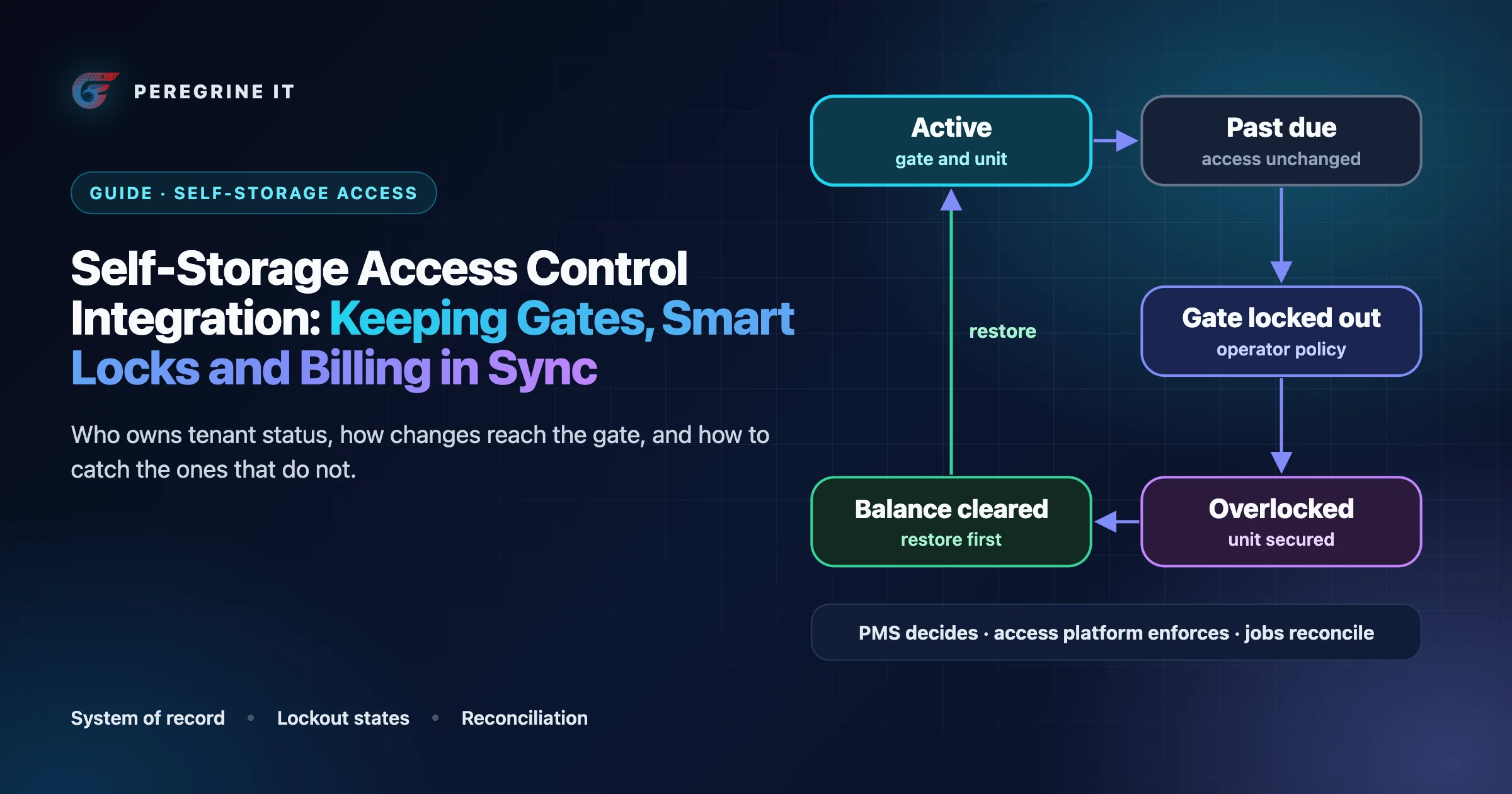
- Active (access: gate and unit). The lease has started and the account is in good standing. The access platform allows the tenant through the gate and into the unit.
- Past due (access: gate and unit). A payment failed or was not made. Access is unchanged while the processor retries and the operator’s grace period runs.
- Gate locked out (access: none at the gate). The operator’s policy threshold passed. The management software disables the gate credential.
- Overlocked (access: none). A further policy step: the unit itself is secured, by a smart-lock command or a staff task with a padlock.
- Moved out (access: revoked). The lease ended. Every credential is revoked and the unit returns to inventory.
From any state, a move-out leads to Moved out. A cleared balance returns Gate locked out or Overlocked to Active, and that restore should take priority over any lockout still waiting in a queue.
Move-in: getting a working code out today
The move-in path, step by step, with what can delay each step:
- Lease signed and first payment taken in the PMS or the online rental flow.
- Unit assigned and credential created. Depending on the products, the PMS generates the gate code, or the access platform does and reports it back.
- Change sent to the access platform by whichever model applies above. This is where the delay lives.
- Credential programmed at the site: to a cloud-connected keypad, a gate controller, or, for Bluetooth locks, to a mobile key the tenant's phone presents. Nokē, for example, says its current system uses Bluetooth unit controllers at the door to control each lock.
- Confirmation, where the platform offers it, that the credential is live.
Two published details show why the tenant-facing message should depend on the facility's integration rather than promise “instant” access. SpiderDoor says a tenant with a future move-in date will not have a working code until that date arrives, and suggests a temporary master code that deletes itself for early access. Stora says it automatically transitions reserved units to occupied on the tenancy's start date, a job that runs at approximately 6:00 AM in the operator's local timezone, and offers a separate grant-access call for earlier access.
What we would build around that:
- Store the expected sync delay per facility, from the vendor's answer, and show the tenant an honest message (“your code will work within a few minutes”) instead of a guess.
- Give managers a resync action and a visible status per tenant: desired state, last sent, last confirmed. SpiderDoor, for instance, has a Sync Location Codes button that can be used up to ten times in a 24-hour period; know whether yours has a limit like that.
- Make any manual override (an early-access code, a gate opened remotely) carry an expiry and an author, so reconciliation can tell it from drift.
Move-out: revoking everything
Move-out is the flow most likely to leave a stale permission behind, because nothing goes wrong visibly when a former tenant's code keeps working. The PMS ends the lease and computes the target state, no access, for every credential tied to that tenant: gate codes, mobile keys, shared or secondary users if the product supports them, and any temporary codes. The unit returns to inventory only after the access platform confirms the revocation, or after reconciliation does. Where the hardware supports it, a reassigned unit lock should be re-keyed or re-paired for the next tenant rather than inherited.
Unit identity is the other trap. DaVinci Lock's help center says that when a facility already using its locks is connected to a management system, its software will attempt to retroactively assign the locks to your units in your FMS, and asks operators to ensure the unit numbers match the naming convention within your FMS. A unit called A-101 in one system and A101 in the other is a lock attached to the wrong tenant, or to none. We would keep an explicit mapping table per facility and validate it before any facility goes live.
Failed payments and access restrictions as events
Delinquency is where billing and access meet, and where an integration has to be precise about what each event means. Taking Stripe as a documented example of a processor:
- Stripe Billing can automatically retry failed subscription and invoice payments for you, and the recommended default setting is 8 tries within 2 weeks.
- Stripe's instruction is to use the invoice.payment_failed webhook to receive subscription payment failure events and retry attempt updates.
- A hard decline is different: we can't retry invoice payment without a new payment method. And after the final payment attempt, Stripe makes no further payment attempts; what happens to the subscription then (canceled, unpaid, left past due or paused) is a setting the account chooses.
- A
past_duesubscription is not a promise of another try: Stripe says this status doesn't guarantee another payment attempt. - On success, Stripe's guidance after
invoice.paidis to retrieve the associated subscription and confirm that its status is active before extending the customer's access expiry date.
Those are payment facts, not access decisions. Stripe's subscription guidance is written for software products, where revoking access is low stakes. At a storage facility, the decisions that follow a failed payment (how long the grace period is, when the gate code stops working, when a unit is overlocked, what notices go out) are the operator's policy. Products automate the steps the operator configures: Stora notes that operators can also configure Stora to auto-overlock units when a payment fails, Nokē lists automated overlocking and release among its features, and OpenTech says operators can automate and monitor overlocks and unit access remotely.
Lien and notice rules are not software defaults. Notice periods, the conditions for denying access, and the steps before a lien sale are set by each state's law and by the operator's own counsel. A platform should hold them as per-state, per-facility configuration that counsel has reviewed, keep a record of every notice and state change, and never ship one state's rules as the default for another. This article states no legal rules.
The pattern we would use is to compute the desired access state from current facts each time anything relevant changes, instead of reacting to each event with a command. A payment event, a manager override, a nightly policy check and a reconciliation run all call the same function, so repeated or reordered events converge on the same answer.
Illustrative desired-state function (pseudocode; field and policy names are examples):
// Illustrative pseudocode. Thresholds come from per-facility policy that the
// operator (and, for lien steps, its counsel) has configured; none are defaults.
desired_access(tenancy, ledger, policy, overrides, today):
    if tenancy.ended:                         return 'revoked'
    if today < tenancy.start_date and not overrides.early_access_active:
                                              return 'none'
    if overrides.never_lock_out_active:       return 'full'
    days = ledger.days_past_due(tenancy, today)   // ledger, not the processor's status
    if days >= policy.overlock_after_days:    return 'overlocked'
    if days >= policy.gate_lockout_after_days or overrides.always_lock_out_active:
                                              return 'gate_locked'
    return 'full'

on any of (payment_posted, payment_failed, lease_changed, override_changed,
           daily_policy_check, reconciliation_run) for tenancy t:
    target = desired_access(t, ...)
    if target != t.access_state:
        record_transition(t, from = t.access_state, to = target, cause = event)
        enqueue_access_change(t, target)     // job id = tenancy + target version
        // restores go to a higher-priority queue than lockouts
Two details in that sketch matter in production. The daily policy check runs per facility in the facility's local time zone, so a lockout does not fire at the wrong local hour. And restores outrank lockouts: a tenant who has just paid and is standing at the gate is the most visible failure an integration can have. For the queue mechanics behind enqueue_access_change (attempts, backoff, job ids and priorities), see reliable background jobs with Redis and BullMQ.
Facilities with different gate and lock vendors
An operator that grows by acquisition inherits whatever each facility ran. SpiderDoor describes the effect on logins alone: sites on different management software sit in separate accounts. Across lock vendors the differences go deeper: some control the gate only, some control each unit, some talk to their cloud over a site network or cellular link, and some deliver credentials through the tenant's phone over Bluetooth.
The approach is an internal access interface with one adapter per vendor, so the rest of the platform never needs to know which hardware a facility has. That is the approach in our self-storage management platform case study: an operator running 150+ facilities across 12 states, where an IoT bridge put Nokē, PTI and Janus smart locks behind one API over MQTT and normalized commands (lock, unlock, check status) across vendors. The case study reports gate access setup in under 3 seconds on that platform, and that a fourth lock vendor added later took two weeks instead of two months. Those are figures for one platform, not a promise for another vendor mix.
Illustrative adapter interface (TypeScript-style; names are examples, not a vendor API):
// Illustrative. Each vendor adapter declares what it can do; the platform
// checks capabilities instead of branching on vendor names.
interface AccessAdapter {
  capabilities: {
    gate: boolean;            // gate or door controller
    unitLocks: boolean;       // per-unit lock control
    overlock: boolean;        // can secure a unit remotely
    readBack: boolean;        // can list credentials actually applied
    offlineBehavior: string;  // as documented by the vendor
  };
  // Idempotent: applying the same change twice has no further effect.
  apply(facilityId: string, change: AccessChange): Promise<ApplyResult>;
  // What the site actually enforces, for reconciliation.
  listApplied(facilityId: string): Promise<AppliedCredential[]>;
}
Two parts of that design carry most of the weight. The capabilities object is what turns “overlock” into a lock command at one facility and a staff task with a padlock and a confirmation step at another. And listApplied, where a vendor supports it, is what makes reconciliation possible; where it does not, the plan has to say how drift will be detected instead.
Failure and reconciliation
Every model above loses or delays a change sometimes. Webhook senders give up eventually: Stora, for example, says it automatically retries failed deliveries up to 6 times, and that after 6 failed attempts, the delivery is marked as failed. Receiving those events safely (signatures, duplicates, ordering, dead letters) is covered in reliable webhook and event-driven integrations; what follows is specific to access.
| Failure | What the tenant or manager sees | What catches it |
|---|---|---|
| Missed event | A paid tenant still locked out, or a moved-out tenant still able to enter | Reconciliation that compares desired state with applied state; an alert on the count of paid-but-locked tenants |
| Duplicate or out-of-order events | Access flips back to an older state | Recomputing the desired state from current facts instead of replaying commands; idempotent apply keyed on tenancy and version |
| Bridge or sync tool stopped | Changes stop reaching one facility; nothing errors | An alert on silence: no applied change from a facility for longer than its normal gap |
| Site offline | Codes changed during the outage do not take effect | Per-facility queues that hold changes, then apply the latest desired state for each tenant when the site returns |
| Stale or stray credentials | A temporary or master code still works | Expiry on every manual credential; reconciliation lists credentials with no owning tenancy |
| Unit mapping drift | A lock follows the wrong unit or tenant | A mapping check after any unit renumbering, and before each facility goes live |
Offline behavior is a hardware question as much as a software one, so get it in writing per facility. SpiderDoor, for example, says that if the building's internet drops, cellular keypads keep running, and that whether the gate stays shut or opens with the power out is set by the gate hardware, not the keypad.
The reconciliation job itself runs per facility on a schedule and after any outage: read the desired state for every tenancy, read what the access platform reports as applied where it can, and repair differences through the same apply path the event handler uses. It should report three numbers to the people who run the facilities: changes repaired per run (a rise means the event path is leaking), tenants paid but locked out, and credentials active with no current tenancy. The first is an engineering signal; the other two are the ones a district manager will care about.
Questions to ask each gate and lock vendor
- Which management systems do you integrate with, and by which route for ours: a direct API, webhooks, a bridge application, or a scheduled sync?
- How long does a new credential take to work at the gate, and is an edited or revoked credential slower than a new one?
- Where is a lockout decision made, in your system or in the management software? (SpiderDoor publishes this exact question among the questions worth asking any vendor.)
- Can we read back the credentials and lock states actually applied at a facility, through an API or an export?
- Does your platform report delivery and failure of each change, or only accept it?
- What keeps working when a site loses internet or power, and how do changes made during an outage catch up?
- Is a manual resync available, and is it rate-limited?
- How are units matched between your system and the management software, and what happens when a unit is renumbered?
- How are overlocks handled: a remote lock command, a staff task, or both? Can release be automated on payment?
- Who activates a new facility on the integration, how long does it take, and what credentials does each facility need?
Frequently Asked Questions
Should the management software or the access-control system decide when a tenant is locked out?
The management software, because it holds the ledger, payment arrangements and overrides. The access platform enforces the result. Published integrations describe the same split: in QuikStor’s integration with OpenTech, QuikStor serves as the system of record for tenant accounts and OpenTech’s systems execute access permissions.
How quickly do gate codes sync from self-storage software to the keypad?
It depends on the management software and the integration. SpiderDoor says some platforms sync in real time while others sync every eight to twelve minutes, and that on SiteLink an edited code syncs roughly three times a day. Ask each vendor for the figure that applies to your facilities.
Can a tenant get access back immediately after paying a past-due balance?
Only as fast as the slowest step: the payment posting to the ledger, the change reaching the access platform, and the platform programming the site. Some products automate it; Storable, for example, lists sending locked-out tenants a payment link to restore access on Storable Edge. In a custom platform, restores should run ahead of any queued lockouts.
Can facilities with different gate and lock vendors run on one system?
Yes, with an internal access interface and one adapter per vendor, so the rest of the platform does not depend on which hardware a facility has. Our case study platform put Nokē, PTI and Janus smart locks behind one API this way.
Should lien and lockout rules be hard-coded in the software?
No. Notice periods, access restrictions and lien steps are set by each state’s law and the operator’s counsel. Hold them as per-state, per-facility configuration that counsel has reviewed, with a record of every notice and state change.
Vendor statements were read on their public pages, or in trade-press reports of vendor releases, on October 19, 2026, and products change often. We have not evaluated these products, this is not a ranking, and we do not claim a partnership with any vendor named. Pseudocode and interfaces marked illustrative are examples, not a vendor API or a description of a client system.
Planning to connect management, billing and access systems across your facilities? See our self-storage software page and our API integration service. Every project starts with a 30-minute technical discovery call with an engineer.
