What makes this migration different
You have bought a group of facilities, and each one arrived with its own management software, its own gate system and its own payment processor. Moving them onto one system is a data migration, but three things make it different from moving a typical business application. The facilities stay open while you do it. Every tenant record is tied to money (a balance, a paid-through date, an autopay) and to physical access (a gate code, a lock). And the most sensitive part of that record, the stored card or bank account, usually does not come out of a software export at all.
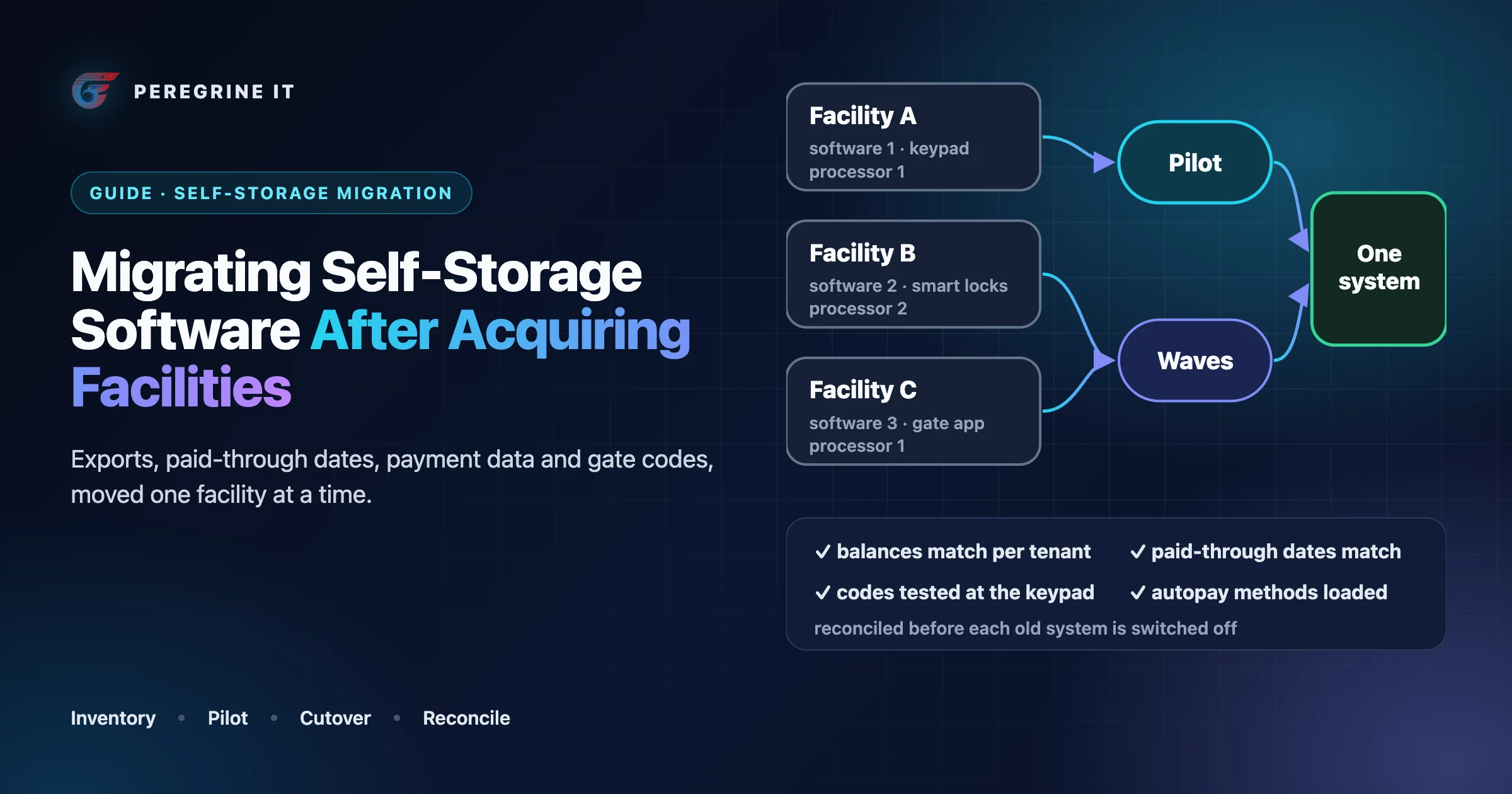
The order of work: inventory each facility, get exports and answers from the outgoing vendors, map the data, settle the payment-data route with the processors early, plan access separately, pilot one facility, then move the rest in waves, reconciling before each old system is switched off.
This guide assumes you have chosen the target system; if not, start with self-storage management software: build or buy. General migration mechanics (id maps, change data capture, checksums, rollback windows) are in our legacy platform data migration guide, and how gates, locks and billing stay in step after the move is in self-storage access control integration. This article covers what is specific to moving self-storage facilities.
Start with a facility-by-facility inventory
Acquired portfolios are rarely uniform. In our self-storage case study, an operator running 150+ facilities across 12 states had keypads at some facilities, Bluetooth locks at others and physical keys at a few, and its reservation system, billing engine and access control software were three separate vendors with no API integration, synchronized by nightly CSV exports. Before anything moves, write down what each facility actually runs. One row per facility:
| What to record | Why it matters |
|---|---|
| Management software, edition and hosting (cloud or on-premises) | Decides the export options and who you ask for them |
| Contract owner, term, renewal date and notice period | Sets the latest date you can switch without paying for overlap |
| Export formats available, and who can run them (you, or only the vendor) | Some data may only come out through the vendor's support team |
| Gate and keypad vendor, and how it connects to the software | Decides whether access can move with the data or needs its own cutover |
| Smart locks or overlocks on units, by vendor | Each vendor is its own integration in the new system |
| Payment processor, merchant account owner, and the share of tenants on autopay | Decides how stored payment methods move (see below) |
| Website, online rental, call center, kiosk and insurance links | Every one of these is an integration that will point at the wrong system after cutover |
| Number of units, occupied units, tenants on autopay, tenants past due | The baseline numbers you will reconcile against |
| State the facility is in | Delinquency, notice and lien rules are set by each state |
| Local constraints | Busy season, a manager leaving, construction, a pending sale |
The table also sets your migration order: facilities on the same source software share a conversion script, and those with unusual gate hardware or many past-due tenants go later.
Questions to ask the outgoing vendor
The contract with each outgoing vendor decides what you can get and when. These are questions to put to the vendor and to your own counsel, not legal conclusions; terms differ by vendor and by contract.
- Who owns the data? Does the contract say the facility data belongs to the operator, and does that survive the change of ownership that came with the acquisition? Is the agreement assignable to you, or does it have to be re-signed?
- What exactly is in the export? Tenants and contacts only, or also ledgers, payment history, notes, documents, signed leases, gate access logs and audit history? In which format, and with which identifiers?
- Can you run the export yourself, and how often? You will need more than one: a trial export for mapping, a rehearsal export, and the final one on cutover day.
- Is read-only access offered after termination? For how long, and at what cost? Staff will need to look up old history.
- What is the notice period, and what stops at the end? The gate integration, the online rental page, automated emails: on which date and at what time?
- Who controls the payment data, and will they cooperate with a transfer? Often this is the processor rather than the software vendor (see the payment section). Find out who the merchant of record is for each facility.
- What happens to the data after termination? Deleted, retained or returned, with written confirmation?
Ask early. The answers often set the migration date.
Map the data, entity by entity
Write the mapping down as a table, one row per target field, with the source field, the transformation and what happens to values that do not fit. The rows that need a business decision appear here, weeks before cutover. The mechanics (the mapping table, a permanent id map, and a quarantine for rejected rows that must reach zero) are described in the legacy migration guide; below are the self-storage entities and what tends to go wrong with each.
Units and unit inventory
Units are the anchor: leases, access zones and smart locks are assigned to them, and occupancy is counted from them. Agree on the unit identifier first. Unit numbers that look the same can differ in zero-padding, suffixes or building prefixes between systems (“A-101”, “A101”, “0101”), and every downstream match depends on them. Carry over type, dimensions, building, climate control, status (rentable, occupied, reserved, out of service), and the standard and current rates separately. If you rename units to a portfolio standard, do it in the mapping with a lookup table, before any lock or gate data is matched.
Tenants and leases
Carry primary and alternate contacts, the business name for commercial tenants, communication preferences, signed leases, and protection or insurance enrollment. Keep the original move-in date; do not let the import set it to the conversion date. Tenants with several units, and units with several authorized people, are where duplicates and missing access appear, so give them their own test cases.
Billing: balances, paid-through dates and credits
The paid-through date is the field to protect most. It decides when a tenant is next billed, when they become late, and when access is restricted. For each occupied unit, carry over:
- current rent and any scheduled rent change;
- the paid-through date;
- the balance, split into rent, fees, protection, merchandise and tax where the source allows;
- prepaid rent, credits and deposits;
- the autopay flag and billing day;
- discounts and promotions with their end dates.
Decide whether to migrate the full ledger as transactions, or an opening balance plus read-only history. An opening balance is simpler to load and reconcile; full history helps staff in disputes, but every transaction must map to a type in the new system. Either way, each tenant's balance must match the old system on cutover day.
Settle billing-day logic before cutover. If one system bills on the move-in anniversary and the other on the first of the month, every tenant needs an explicit rule for the first period.
Delinquency and historical records
Tenants who are past due on cutover day are the highest-risk records in the migration. Late fees, notices, access restrictions, overlocks and lien sales are governed by the law of the state where each facility sits, and the procedures differ between states. This article does not describe those rules. The operator's counsel sets them, and the new system should hold them as per-state configuration that counsel has reviewed.
What the migration has to do is narrower and still important:
- Freeze delinquency automation around cutover. Pause automated late fees, notices and access changes in the old system before the final export, and keep them paused in the new system until the first reconciliation passes. A fee or notice generated twice, or a step skipped because the new system starts counting from zero, is the failure to avoid.
- Carry the current stage and its history. For each past-due tenant: the date the balance became past due, the fees already charged, every notice already sent with its date and method, and whether access is restricted or the unit is overlocked. The new system needs these to continue a process already in progress rather than restart it.
- Keep the documents. Copies of notices, proof of mailing and any related correspondence must be retrievable after the switch, whether imported or archived.
- Consider moving facilities with active lien proceedings later, and ask counsel whether to complete or pause those steps first.
For closed history (move-outs, past tenants, old payments), decide what is imported, what is archived, and for how long.
Payment methods: a processor question, not an export field
A software export usually gives you a tenant's autopay flag and perhaps the last four digits of a card. It does not normally give you the card itself. Card numbers are held by the payment processor or its vault, and moving them is a transfer between processors under PCI rules, which both processors have to agree to and carry out. Whether a given set of stored cards or bank accounts can move to your new processor depends on the old processor, the new processor and your agreements with them. Confirm it with both before you set a date.
Questions to put to both the old and the new processor before you set a date:
- Who has to request the transfer, and how long does it take from request to completion?
- Which payment methods move (cards, bank accounts) and which do not?
- What happens to card updates made at the old processor while the transfer is running?
- How will the new processor tell you which old customer record became which new one, so your system can link each tenant to the right payment method?
- Can new tenants be charged on the new processor while existing tenants are still charged on the old one?
Each processor has its own terms, and some transfers are not possible at all. Plan for three outcomes per facility:
- Transfer confirmed. Schedule it with both processors, freeze card updates in the old system for the window, and load the old-to-new customer mapping before the first billing run.
- Transfer partial. For example, cards move but bank accounts do not, or some tenants' records are rejected. Identify those tenants before cutover.
- No transfer. Tenants re-enter their payment details. Start the outreach well before cutover, through more than one channel, and keep those tenants off automatic late fees until they have had a fair chance to re-enroll.
Payment history is separate from the stored payment method: export it from the old software's ledger and from the old processor's reports. For reference, billing in our case study runs on Stripe with automatic retries for failed payments.
Gate codes and lock assignments
Access is where a migration becomes visible to tenants within minutes. Plan it as its own workstream with its own vendor contacts. How access stays in step with billing once everything runs on the new system is covered in our access control integration guide; these are the points specific to the move.
Gate codes follow the tenant. Migrate each code with the tenant and unit, and decide in advance whether codes stay the same. Keeping them avoids a wave of calls on cutover day. If the new system needs a different format, or old codes were shared, change them and tell tenants before the switch.
Sync speed decides your cutover window. Ask your gate-access vendor how quickly a new code, and separately an edited code, reaches the keypad on both the old and the new software; the answers can differ. If the new path is slower than staff expect, a tenant who pays a past-due balance after cutover may stand at a locked gate.
The gate integration may need to be set up, not just switched. A gate or smart-lock vendor listing your new software as supported does not mean the connection is live for your facilities. Confirm support for your exact hardware and target software, ask how the connection is made and how long setup takes, and put that lead time in the plan.
Lock assignment depends on unit naming. For smart locks and electronic overlocks, the lock-to-unit assignment must survive the move. Ask your smart-lock vendor how it matches locks to units when it is connected to a new management system; if it relies on unit numbers, those numbers must match the naming in the new system exactly. This is another reason to settle unit identifiers before anything else.
Mixed hardware across acquired facilities is normal. If facilities keep different gate and lock vendors, the target system needs one way to grant, revoke and audit access across all of them. In our case study that was an abstraction layer that normalizes lock commands (lock, unlock, check status) across vendors, with three smart lock vendors behind one API; when the client later added a fourth lock vendor, integration took two weeks instead of two months.
Several software platforms can also mean several vendor accounts. Ask whether your gate vendor needs a separate account or configuration for each management software platform. During a staged migration you will have facilities on both the old and the new software, so staff may work across two admin logins until the last facility moves.
Pilot one facility, then move the rest in waves
Move one facility first. Choose one that is small enough to recover by hand, but whose data includes the hard cases: autopay tenants, past-due tenants, multi-unit tenants, and the gate hardware most of your portfolio uses. One operator who wrote for Inside Self-Storage about switching his own software, Tim Davis of American Storage (January 16, 2026), described the same instinct: “I started with my smallest self-storage facility first”, because it would be the easiest one to update and change back if it didn't work out. The rollout in our case study went to 10 pilot sites before the full deployment across 150+ facilities.
What “parallel” can mean here. A full parallel run, with both systems live and kept in step, is hard in self-storage because there is one gate, one keypad and one stored card per tenant. Two systems cannot both own them. A more practical parallel period:
- The new system is loaded from a rehearsal export and refreshed daily, but takes no payments and controls no gates.
- Staff work in the old system as usual; someone repeats a sample in the new one and compares results: a move-in, a payment, a partial payment, a move-out, a unit transfer, a late fee.
- Daily reconciliation (below) runs against both until differences are zero or explained.
Schedule the cutover once that period has covered these transaction types and at least one billing day.
Waves after the pilot. Group the remaining facilities by source software, gate vendor and state, so each wave reuses a tested conversion and gate setup, and let the previous wave complete a billing cycle first.
Cutover at a facility
A per-facility checklist, owned by a named person, with a verification for each step:
- Tenants told in advance about anything they will notice: a new payment portal, a new app, new gate codes, new receipts.
- Gate vendor and lock vendor booked for the cutover window, with the new integration tested against a test unit.
- Payment-data transfer completed, or the re-collection plan started, for every autopay tenant.
- Delinquency automation paused in the old system; scheduled jobs (late fees, notices, autopay runs) checked for the cutover day.
- Old system closed to new transactions at a set time; final export taken.
- Final load into the new system; reconciliation checks run; go or no-go decided by the named owner against written criteria.
- Gate integration switched to the new system; a test code, a new code and a suspended code tested at the keypad.
- Website rental flow, call center, kiosk and insurance links pointed at the new system.
- Staff on site or on call for the first hours; a manual access procedure ready if the gate sync fails.
- Automation resumed one item at a time, autopay and late fees last, after the first reconciliation passes.
Some operators keep access permissive during the switch. The operator quoted above “left the gate open on the first day until I was sure all the data had transferred”. That is a security trade-off. A narrower option is to keep the old codes valid in the gate system until the new sync is confirmed, with staff present.
Reconciliation
Run the same checks on both systems. Each has an expected difference of zero or a written exception. Checksum and sampling techniques are in the legacy migration guide; these are the self-storage checks.
| Check | Compared how | Typical cause of a difference |
|---|---|---|
| Units by status and type | Counts per facility | Unit renaming, out-of-service units mapped as rentable |
| Occupied units and occupancy | Counts per facility | Reserved units or move-outs on cutover day |
| Tenants and active leases | Counts, plus a sample by name | Multi-unit tenants merged or split |
| Balance per tenant | Per-tenant comparison, not only totals | Fees not mapped, credits dropped, tax split differently |
| Paid-through date per unit | Per-unit comparison | Billing-day rule change, prepaid months |
| Autopay tenants with a working payment method | Count of autopay flags vs payment methods loaded | Rejected or untransferred cards |
| Past-due tenants by stage | Per-tenant comparison of stage and notice history | Notices not imported, stage recalculated from zero |
| Gate codes and access status | Per-tenant comparison of code and status, then a sample tested at the keypad | Code format changes, suspended tenants imported as active |
| Lock assignments | Per-unit comparison | Unit naming mismatch |
| Revenue for the last full month | Old system report vs migrated history | History loaded partially |
A total that matches can hide two errors that cancel out. Compare per tenant and per unit, and treat any unexplained difference as a bug.
Rollback planning
Decide before cutover how you would go back, and what you could not undo. The general structure (a defined window, written triggers, reverse sync or an explicit fix-forward decision) is in the legacy migration guide. In self-storage, the list of things that do not roll back is long:
- Payments already taken through the new processor, and refunds issued.
- Notices already sent, late fees already charged, and access changes already made at the gate.
- Gate codes already communicated to tenants.
- The payment-data transfer itself, and any cancellation of automatic billing at the old processor.
- The old vendor contract, once its notice period has ended.
So keep the old system readable and its contract active until the window closes, keep gate codes unchanged if you can so the old system remains a working fallback, and write the triggers down: for example, the gate rejects current tenants, or balances fail reconciliation for more than an agreed number of tenants. Name who decides.
Validation through the first billing cycle
Most data errors surface when the new system first acts on its own. Watch:
- The first autopay run. Compare the number and value of charges with what the old system would have run, and review declines by reason before retrying cards in bulk.
- The first invoice or statement run. Review a sample before it is sent.
- The first late-fee and notice run, against counsel's per-state configuration, with someone checking it before it goes out.
- Gate access logs for denied entries by tenants who are current.
- Staff corrections. Log every manual fix with its cause; a pattern points to a mapping error that would affect later waves.
- Old-processor charges. Confirm that the old processor has stopped billing tenants, so no one is charged twice.
Run the reconciliation daily until a full billing cycle completes with no unexplained differences, then decommission the old system and archive its final export.
Standardize, or put a layer over several systems?
Sometimes a facility cannot move yet: a long contract, unsupported gate hardware, a pending sale. The alternative is an integration layer that reads from several management systems and gives one portfolio view of occupancy, revenue and access while facilities move over time. That is close to the second option in our build or buy guide, keeping a product and building on its API, and the case study shows the third: one platform that replaced the separate systems.
Frequently Asked Questions
Can stored cards move from one payment processor to another?
Sometimes, as a transfer between the processors rather than a software export. Whether it is possible depends on the old processor, the new processor and your agreements with them. Confirm with both before setting a date, and plan for tenants whose details do not transfer.
Do gate codes have to change when we switch management software?
Not necessarily. Migrating each code with its tenant and unit avoids calls on cutover day. Change codes only if the new system needs a different format or old codes were shared, and tell tenants first. Ask the gate vendor how long new and edited codes take to reach the keypad on the new software.
How should tenants who are past due on cutover day be handled?
Pause delinquency automation before the final export, carry each tenant’s current stage, fees and notice history into the new system, and resume automation only after reconciliation passes. Late-fee, notice and lien rules are set by each state’s law and the operator’s counsel, not by the migration.
Should all acquired facilities move at once?
Move one pilot facility first, then the rest in waves grouped by source software, gate vendor and state. The rollout in our self-storage case study went to 10 pilot sites before the full deployment across 150+ facilities.
This guide does not name gate, lock or payment vendors and claims no partnership with any. Nothing here is legal advice; delinquency, notice and lien procedures are for your counsel.
Consolidating facilities onto one system? See our self-storage software page and our API integration service, which covers connecting management software, gate systems and payment processors. Every project starts with a 30-minute technical discovery call with an engineer.
